> ## Documentation Index
> Fetch the complete documentation index at: https://docs.allgoodhq.com/llms.txt
> Use this file to discover all available pages before exploring further.

# Capture a form

> Point a form on your own website at allGood by adding one attribute to markup you already have.

allGood does not render forms. A form in allGood is a **definition** — the fields it collects, plus its capture settings. The markup on your page stays yours: your HTML, your CSS, your layout, your validation messages.

The script connects the two.

<Note>
  Coming from Marketo Forms 2.0: there's no embed code that draws a form, nothing to restyle afterwards, and no field mapping step. The nearest equivalent is Forms 2.0's "submit from your own markup" pattern — except here it's the only pattern, and it's fully supported.
</Note>

## The whole integration

```html theme={null}
<!-- once, in <head> -->
<script src="https://mk.brand.com/_ag/v1.js" async></script>

<!-- your own markup, styled however you like -->
<form data-ag-form="f7k2m9qp">
  <label>Email
    <input type="email" name="email" required />
  </label>
  <label>First name
    <input type="text" name="firstName" />
  </label>
  <button type="submit">Request a demo</button>
</form>

<p data-ag-form-status="f7k2m9qp"></p>
```

No tracking key is needed for forms. Forms are identified by their own id and gated by the [allowed origins list](/mk/developer/web-edge/allowed-origins).

## Where the form id comes from

Every form has an eight-character short id, minted once and stable across renames and new versions. Find it on the form's **Settings** tab, as the **Form ID** row, next to the full capture endpoint with a copy button.
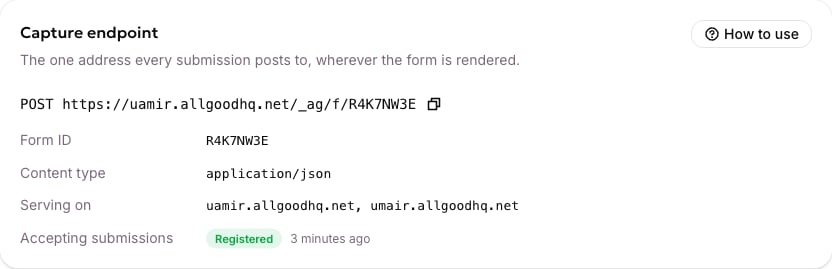
<Frame caption="A form's Settings tab, showing its Form ID, its capture endpoint, and whether it is accepting submissions.">
  <img src="https://mintcdn.com/allgoodtechnologyinc/bf1LRHwyriZvgDxT/images/mk/web-edge/integrate-form-settings-endpoint.png?fit=max&auto=format&n=bf1LRHwyriZvgDxT&q=85&s=53aa014fd0d3e8bf5961fefdea3e81e6" alt="A form's Settings tab, showing its Form ID, its capture endpoint, and whether it is accepting submissions" width="832" height="269" data-path="images/mk/web-edge/integrate-form-settings-endpoint.png" />
</Frame>

The **How to use** button on that card is worth knowing about: it generates the embed snippet from *this* form's real configuration — its actual fields, its honeypot name, whether it needs a bot check — rather than a generic example. A generic example is wrong for most forms in at least one of those, and wrong in ways that produce a silent refusal.
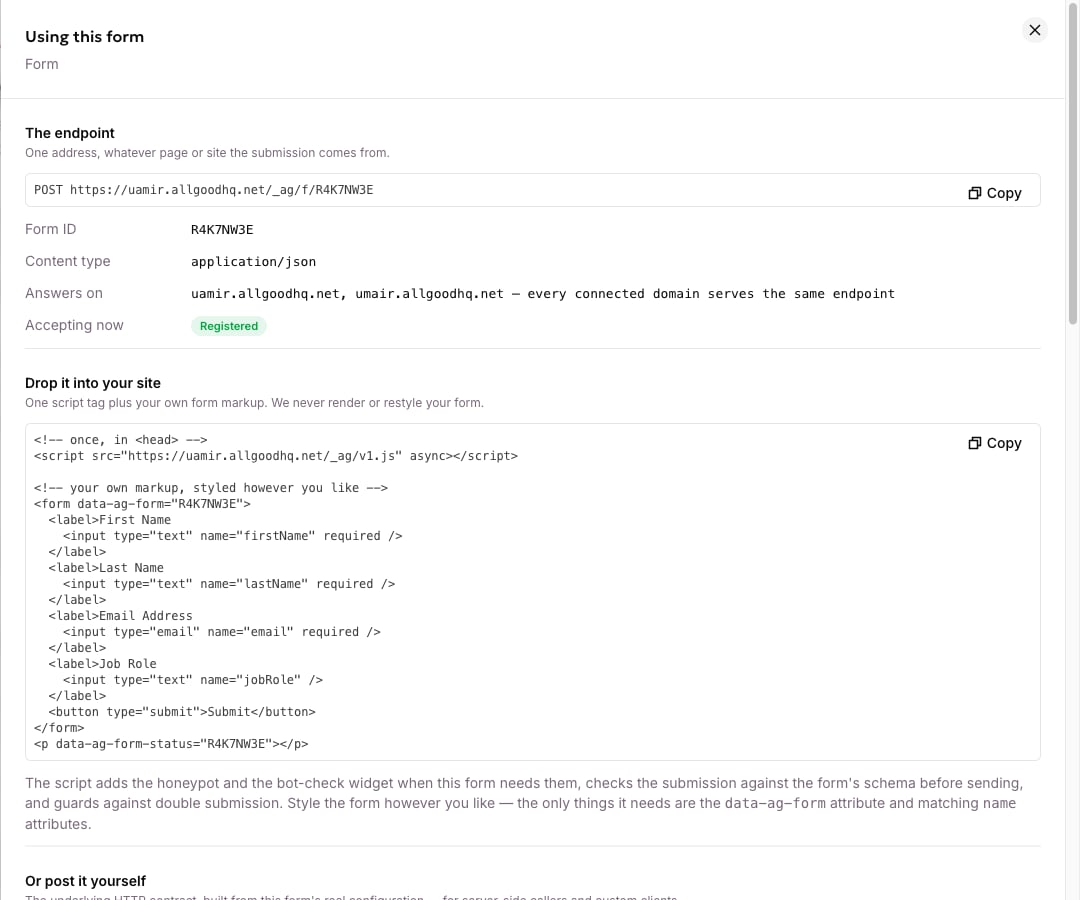
<Frame caption="The How to use drawer, with an embed snippet built from this form's real fields.">
  <img src="https://mintcdn.com/allgoodtechnologyinc/bf1LRHwyriZvgDxT/images/mk/web-edge/integrate-form-integration-drawer.png?fit=max&auto=format&n=bf1LRHwyriZvgDxT&q=85&s=7ff522a3bc1681a29187b4fa51a09f26" alt="The How to use drawer, with an embed snippet built from this form's real fields" width="1080" height="900" data-path="images/mk/web-edge/integrate-form-integration-drawer.png" />
</Frame>

## The attributes

| Attribute                        | On           | Purpose                              |
| -------------------------------- | ------------ | ------------------------------------ |
| `data-ag-form="{formId}"`        | the `<form>` | Binds this form to an allGood form   |
| `data-ag-form-status="{formId}"` | any element  | Where the outcome message is written |

Leave the status element out if you'd rather write your own copy, and listen for the events below instead.

## The default messages

| Outcome                   | Message                                                |
| ------------------------- | ------------------------------------------------------ |
| Accepted                  | Thanks! Your submission was received.                  |
| Refused as a bot          | We couldn't verify you're human. Please try again.     |
| Too many attempts         | Too many attempts. Please wait a moment and try again. |
| Failed validation         | Please check the form and try again.                   |
| Not accepting submissions | This form isn't accepting submissions from this page.  |
| Anything else             | Something went wrong. Please try again later.          |

A field the visitor can fix — a missing required value, an address that isn't an email — gets that specific message instead.

## Events you can listen for

All three fire on `document` and bubble.

```js theme={null}
document.addEventListener("allgood:form:submitted", (e) => {
  const { formId, submissionId, email, redirectUrl } = e.detail;
  // fires only on an accepted submission, and BEFORE any redirect,
  // so a conversion tag still gets to run
  window.dataLayer.push({ event: "generate_lead", form_id: formId });
});

document.addEventListener("allgood:form:rejected", (e) => {
  const { formId, status, errors } = e.detail;
  // errors is present only for problems the visitor can fix
});

document.addEventListener("allgood:ready", (e) => {
  console.log("allGood loaded", e.detail.version);
});
```

## What the script does for you

**Collects the fields.** Every named, enabled control becomes part of the submission — text, email, hidden fields, textareas, selects, checkboxes as true or false, and the chosen radio option. Everything you put in the form is sent and stored, including hidden fields and UTM values. There is no mapping step.

**Checks what the visitor can fix.** If the form declares its fields, the script checks them before sending — required values, numbers, email format, allowed options — so the visitor gets a fixable message rather than a rejection.

**Adds the honeypot.** A hidden field bots fill and humans don't. Don't add your own, don't style it visible, and don't let your code write to it.

**Adds the bot-check widget**, if the form requires one, just before the submit button. If it hasn't finished loading when the visitor submits, the script says so rather than sending a submission that would be refused.

**Stops double submissions.** A form binds once even if the script is included twice, and a second click while the first is in flight is ignored. Two submissions would create two records, and the lead would be counted twice.

**Gives up after twelve seconds** and shows the generic error.

## Success redirect

A form can carry a redirect for accepted submissions, set on the form itself. The script navigates there for you, and the `allgood:form:submitted` event fires **before** it does, so a conversion tag still runs.

Because it lives on the form rather than in your markup, changing where visitors land needs no republish of your website. Leave it unset and navigate yourself if you'd rather handle it in your own listener.

## Several forms on one page

Fine. Each form carries its own id, and the script asks about all of them in one request, up to ten per page. The same form id can appear more than once — a header call-to-action and a footer one, say — and both bind independently.

## Before it will work

<Frame caption="What happens to every submission, resolved against one form's real configuration.">
  <img src="https://mintcdn.com/allgoodtechnologyinc/bf1LRHwyriZvgDxT/images/mk/web-edge/integrate-form-integration-checks.png?fit=max&auto=format&n=bf1LRHwyriZvgDxT&q=85&s=d3fd906c32b05339321894e0b0166db8" alt="What happens to every submission, resolved against one form's real configuration" width="1080" height="900" data-path="images/mk/web-edge/integrate-form-integration-checks.png" />
</Frame>

| Requirement                                                 | Check                                                                                               |
| ----------------------------------------------------------- | --------------------------------------------------------------------------------------------------- |
| The form is **registered**                                  | Its Settings tab reads "Accepting submissions: Registered". An unregistered form refuses everything |
| Your origin is **allowed**                                  | [Allowed origins](/mk/developer/web-edge/allowed-origins)                                           |
| If a bot check is required, the widget covers this hostname | Otherwise every submission is refused — see [Bot protection](/mk/developer/web-edge/bot-protection) |

## If the script doesn't load

The script prevents the form's normal submission, so if it never loads, the form falls back to whatever its `action` says. If you need a no-JavaScript fallback, point `action` at your own server and post to the [form capture API](/mk/developer/web-edge/reference/form-api) from there.

## Next

→ [A complete example page](/mk/developer/web-edge/worked-example), or [Troubleshooting](/mk/developer/web-edge/troubleshooting).
