> ## Documentation Index
> Fetch the complete documentation index at: https://docs.allgoodhq.com/llms.txt
> Use this file to discover all available pages before exploring further.
# Connect your subdomain
> Point a subdomain of your own at allGood, with an SSL certificate allGood issues and renews for you.
Everything in this section needs an address. Before a domain is connected, the tracking tag has nowhere to load from, forms have no endpoint, and landing pages have nowhere to be served.
Just connecting a domain for a marketer, not building against it? See [Set up Web Edge Sessions for your site](/mk/settings/web-edge/sessions-setup) for the settings-only walkthrough.
## What you're creating
A subdomain of a domain you already own — `mk.brand.com` is the convention — pointed at allGood. Once it's live, it serves:
* your hosted landing pages, at `https://mk.brand.com/{slug}`
* form capture, at `https://mk.brand.com/_ag/f/{formId}`
* event capture, at `https://mk.brand.com/_ag/e`
* the tracking script, at `https://mk.brand.com/_ag/v1.js`
* click redirects for tracked links in your email
The `/_ag/` path is reserved by allGood. Everything else at the root is yours.
Use a subdomain you aren't already serving something from. Pointing a hostname at allGood takes it over completely — it will serve allGood pages, not your site.
## Before you start
* Access to your DNS provider, or someone who has it.
* The **Admin** role in allGood.
* A subdomain decided. `mk.` is conventional, but anything you aren't using works.
Go to **Settings → Web Edge**. In **Add a subdomain**, type the full hostname — `mk.brand.com`, not `mk` and not `brand.com` — and click **Register**.
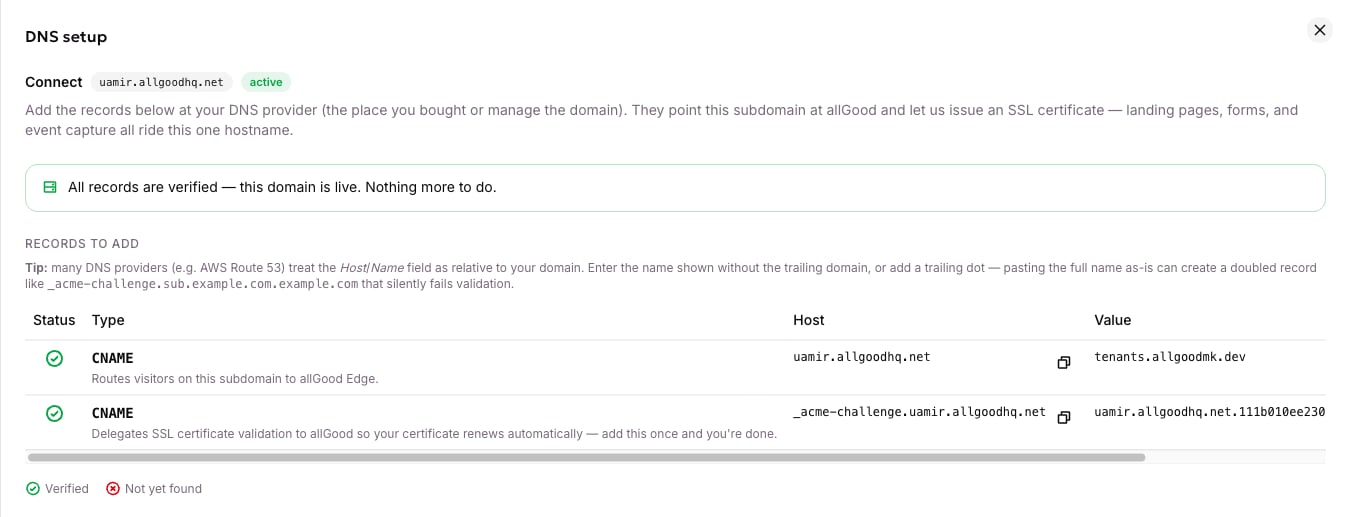
 On the new row, open the **⋮** menu and choose **DNS setup instructions**. A drawer lists every record you need, each with a copy button and a live tick showing whether it has resolved yet.
There is always a `CNAME` that sends visitors on your subdomain to allGood.
| Field | Value |
| ----- | --------------------------------- |
| Type | `CNAME` |
| Host | `mk.brand.com` |
| Value | The CNAME target shown on the row |
The second record proves you own the domain, so allGood can issue an SSL certificate for it. The drawer shows one of two shapes.
**A delegation CNAME** — one record, added once, and renewal is automatic from then on:
| Field | Value |
| ----- | ------------------------------ |
| Type | `CNAME` |
| Host | `_acme-challenge.mk.brand.com` |
| Value | The value shown in the drawer |
**Or TXT records**, at `_acme-challenge.mk.brand.com`. There may be more than one — add every record shown. Missing one means a backup certificate authority can silently fail to renew later.
Most DNS providers treat the **Host** or **Name** field as relative to your zone. Pasting the full name as shown produces a doubled record that fails silently:
```
_acme-challenge.mk.brand.com.brand.com ← wrong
```
Enter the name without your domain suffix — `_acme-challenge.mk` — or add a trailing dot if your provider supports absolute names. This is the single most common setup failure.
DNS takes anywhere from a few minutes to about an hour. Press **Sync** on the Web Edge screen to re-check; the list refreshes about 30 seconds later.
On the new row, open the **⋮** menu and choose **DNS setup instructions**. A drawer lists every record you need, each with a copy button and a live tick showing whether it has resolved yet.
There is always a `CNAME` that sends visitors on your subdomain to allGood.
| Field | Value |
| ----- | --------------------------------- |
| Type | `CNAME` |
| Host | `mk.brand.com` |
| Value | The CNAME target shown on the row |
The second record proves you own the domain, so allGood can issue an SSL certificate for it. The drawer shows one of two shapes.
**A delegation CNAME** — one record, added once, and renewal is automatic from then on:
| Field | Value |
| ----- | ------------------------------ |
| Type | `CNAME` |
| Host | `_acme-challenge.mk.brand.com` |
| Value | The value shown in the drawer |
**Or TXT records**, at `_acme-challenge.mk.brand.com`. There may be more than one — add every record shown. Missing one means a backup certificate authority can silently fail to renew later.
Most DNS providers treat the **Host** or **Name** field as relative to your zone. Pasting the full name as shown produces a doubled record that fails silently:
```
_acme-challenge.mk.brand.com.brand.com ← wrong
```
Enter the name without your domain suffix — `_acme-challenge.mk` — or add a trailing dot if your provider supports absolute names. This is the single most common setup failure.
DNS takes anywhere from a few minutes to about an hour. Press **Sync** on the Web Edge screen to re-check; the list refreshes about 30 seconds later.
 Each row shows four steps:
| Step | Means |
| -------------------- | ----------------------------------------- |
| Hostname created | allGood has registered the hostname |
| DNS propagated | Your routing record is visible |
| SSL active | The certificate is issued and deployed |
| Bot protection ready | The bot-check widget covers this hostname |
The fourth finishes after the others — a widget can only cover a hostname once its certificate is live. If a domain shows **SSL active** but not **Bot protection ready**, press **Sync** again.
Reopen the DNS drawer. When both records resolve you get green ticks and a confirmation that the domain is live.
Each row shows four steps:
| Step | Means |
| -------------------- | ----------------------------------------- |
| Hostname created | allGood has registered the hostname |
| DNS propagated | Your routing record is visible |
| SSL active | The certificate is issued and deployed |
| Bot protection ready | The bot-check widget covers this hostname |
The fourth finishes after the others — a widget can only cover a hostname once its certificate is live. If a domain shows **SSL active** but not **Bot protection ready**, press **Sync** again.
Reopen the DNS drawer. When both records resolve you get green ticks and a confirmation that the domain is live.
 ## While it's provisioning
A domain shows **propagating** while it waits on DNS and the certificate, then **active** once it's serving. Only **active** counts as connected.
If a domain has sat in **propagating** for more than an hour or two, treat it as broken rather than slow. Re-check every record against the DNS drawer, watching for the doubled-name problem above.
## The default domain
You can connect more than one domain. One of them is the **default**: the one allGood fills into every snippet it generates — the tracking tag, the GTM template, form endpoint URLs, published page URLs.
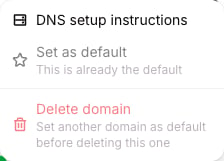
Set it from the row's **⋮** menu. Only an active domain can be the default, and there's only ever one.
## While it's provisioning
A domain shows **propagating** while it waits on DNS and the certificate, then **active** once it's serving. Only **active** counts as connected.
If a domain has sat in **propagating** for more than an hour or two, treat it as broken rather than slow. Re-check every record against the DNS drawer, watching for the doubled-name problem above.
## The default domain
You can connect more than one domain. One of them is the **default**: the one allGood fills into every snippet it generates — the tracking tag, the GTM template, form endpoint URLs, published page URLs.
Set it from the row's **⋮** menu. Only an active domain can be the default, and there's only ever one.
 ## Deleting a domain
**⋮ → Delete domain**, then type the hostname to confirm. Landing pages, form capture and event capture on that domain stop working immediately. You can't delete the default — make another domain the default first.
## The preview domain
Before a domain is connected, and afterwards for testing, allGood also serves a platform preview host of the shape `{yourTenantId}.preview.allgoodmk.app`. Signed page previews and the [hosted test page](/mk/developer/web-edge/test-your-setup) live there. It isn't a substitute for a connected domain — it isn't branded, and it isn't where real traffic goes.
## What "connected" unlocks
* [Web Tracking](/mk/developer/web-edge/web-tracking-tag) can generate your tag and the GTM template.
* Forms show a real capture endpoint instead of a warning.
* Landing pages can be published live.
* The bot-check widget can be provisioned with **Sync**.
## Next
→ [Allowed origins](/mk/developer/web-edge/allowed-origins) — decide which websites may capture.
## Deleting a domain
**⋮ → Delete domain**, then type the hostname to confirm. Landing pages, form capture and event capture on that domain stop working immediately. You can't delete the default — make another domain the default first.
## The preview domain
Before a domain is connected, and afterwards for testing, allGood also serves a platform preview host of the shape `{yourTenantId}.preview.allgoodmk.app`. Signed page previews and the [hosted test page](/mk/developer/web-edge/test-your-setup) live there. It isn't a substitute for a connected domain — it isn't branded, and it isn't where real traffic goes.
## What "connected" unlocks
* [Web Tracking](/mk/developer/web-edge/web-tracking-tag) can generate your tag and the GTM template.
* Forms show a real capture endpoint instead of a warning.
* Landing pages can be published live.
* The bot-check widget can be provisioned with **Sync**.
## Next
→ [Allowed origins](/mk/developer/web-edge/allowed-origins) — decide which websites may capture.