> ## Documentation Index
> Fetch the complete documentation index at: https://docs.allgoodhq.com/llms.txt
> Use this file to discover all available pages before exploring further.
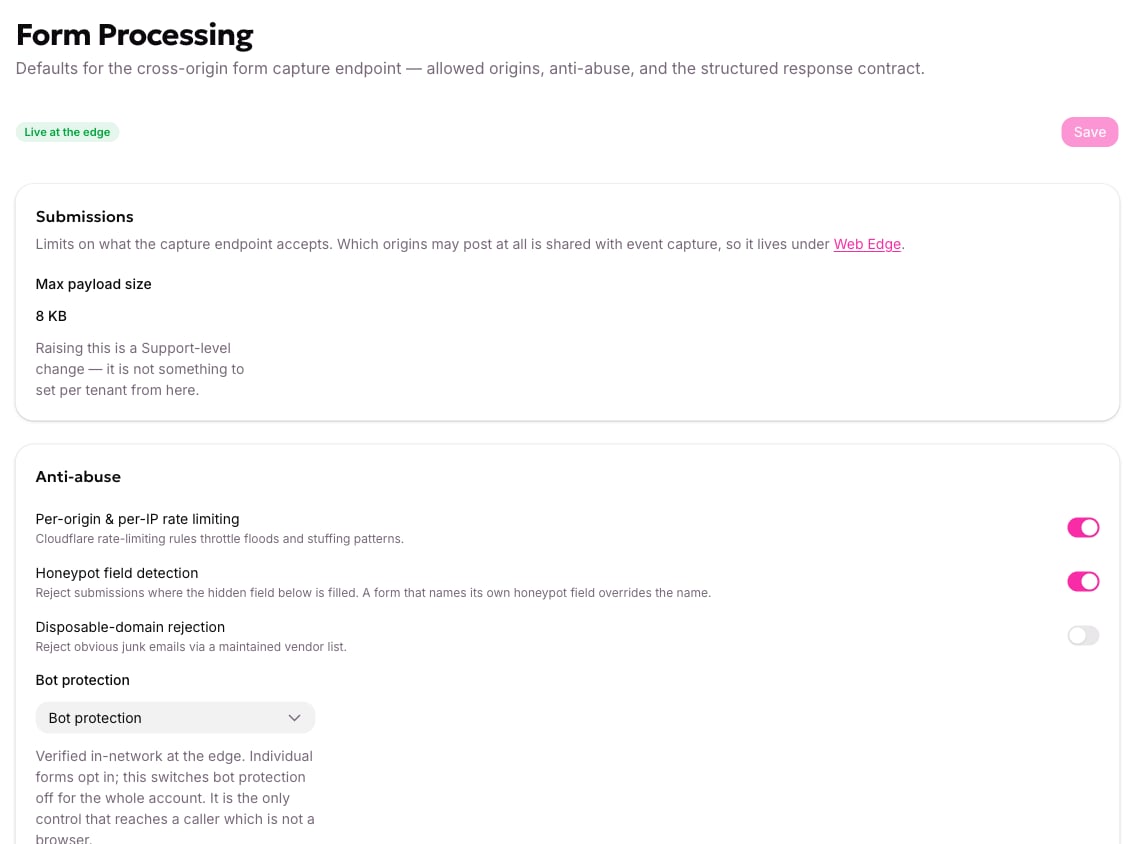
# Form processing
> Account-wide settings for how form submissions are accepted, checked and refused.
Most accounts change nothing on this screen — the defaults are the recommended settings. Read it once so you recognise the behaviour when a submission comes back refused.
Just turning on bot protection for a marketer, not the full anti-abuse picture? See [Turn on bot protection for a form](/mk/settings/web-edge/bot-protection) for the settings-only walkthrough.
**Where:** Settings → Form Processing.
[Allowed origins](/mk/developer/web-edge/allowed-origins) are edited on the Web Edge screen even though they're stored with these settings. That's why their change history shows up here.
 ## Max payload size
Shown as a read-only value, **8 KB** by default. That's generous for a lead form; if you're near it, you're probably sending something that shouldn't be in a form submission. A larger limit is available through support.
It's measured in bytes, not characters, so accented and non-Latin text counts for more than its length suggests. An oversized submission is refused as `validation`.
## The checks, and the order they run in
The anti-abuse checks run in a fixed order and **stop at the first failure**. That means the code you get back names the first thing that was wrong, not everything that was wrong — and exactly one code describes any submission.
### Rate limiting
On by default. Two separate budgets:
| Budget | Limit |
| ------------------- | ------------------------ |
| Per IP address | 30 submissions a minute |
| Per posting website | 300 submissions a minute |
Tracking events have their own separate budgets, so a flood of tracking can't use up the allowance real submissions depend on.
Going over returns `rate_limited`, and the script shows the visitor "Too many attempts. Please wait a moment and try again."
Load-testing a form from one machine trips the per-IP budget after 30 submissions in a minute. That's correct behaviour, not a bug.
### Honeypot field detection
On by default, using the field name `_hp`.
A honeypot is a hidden field a human never sees and never fills. Bots that complete every input fill it, and the submission is refused. Only a **non-blank** value counts — browsers submit empty strings for untouched inputs, and rejecting those would reject everyone.
The allGood script adds the field for you and keeps it empty. Don't add your own, don't style it visible, and don't let your own code write to it. A form can name its own honeypot field, which overrides the account default; switching the check off account-wide beats both.
The honeypot value is kept in the stored record — it's evidence about the submission — unlike the bot-check token, which is discarded once verified.
### Bot protection
**Bot protection** (Turnstile) or **None**. See [Bot protection](/mk/developer/web-edge/bot-protection); the account setting and the form's own opt-in both have to be on for a check to run.
This is described in the app as the only control that reaches a caller which isn't a browser, and that's accurate: a non-browser caller has no website to check and no honeypot worth trusting.
## The response contract
The bottom of the screen lists the codes a submission can come back with. They're read-only — it's a reference, not a setting.
| Code | Meaning |
| ---------------- | ------------------------------------------------------- |
| `accepted` | Stored and queued |
| `validation` | Wrong format, malformed, or over the size limit |
| `unknown_source` | The website isn't allowed, or the form isn't registered |
| `bot` | The honeypot was filled, or the bot check failed |
| `rate_limited` | A submission budget was used up |
## Max payload size
Shown as a read-only value, **8 KB** by default. That's generous for a lead form; if you're near it, you're probably sending something that shouldn't be in a form submission. A larger limit is available through support.
It's measured in bytes, not characters, so accented and non-Latin text counts for more than its length suggests. An oversized submission is refused as `validation`.
## The checks, and the order they run in
The anti-abuse checks run in a fixed order and **stop at the first failure**. That means the code you get back names the first thing that was wrong, not everything that was wrong — and exactly one code describes any submission.
### Rate limiting
On by default. Two separate budgets:
| Budget | Limit |
| ------------------- | ------------------------ |
| Per IP address | 30 submissions a minute |
| Per posting website | 300 submissions a minute |
Tracking events have their own separate budgets, so a flood of tracking can't use up the allowance real submissions depend on.
Going over returns `rate_limited`, and the script shows the visitor "Too many attempts. Please wait a moment and try again."
Load-testing a form from one machine trips the per-IP budget after 30 submissions in a minute. That's correct behaviour, not a bug.
### Honeypot field detection
On by default, using the field name `_hp`.
A honeypot is a hidden field a human never sees and never fills. Bots that complete every input fill it, and the submission is refused. Only a **non-blank** value counts — browsers submit empty strings for untouched inputs, and rejecting those would reject everyone.
The allGood script adds the field for you and keeps it empty. Don't add your own, don't style it visible, and don't let your own code write to it. A form can name its own honeypot field, which overrides the account default; switching the check off account-wide beats both.
The honeypot value is kept in the stored record — it's evidence about the submission — unlike the bot-check token, which is discarded once verified.
### Bot protection
**Bot protection** (Turnstile) or **None**. See [Bot protection](/mk/developer/web-edge/bot-protection); the account setting and the form's own opt-in both have to be on for a check to run.
This is described in the app as the only control that reaches a caller which isn't a browser, and that's accurate: a non-browser caller has no website to check and no honeypot worth trusting.
## The response contract
The bottom of the screen lists the codes a submission can come back with. They're read-only — it's a reference, not a setting.
| Code | Meaning |
| ---------------- | ------------------------------------------------------- |
| `accepted` | Stored and queued |
| `validation` | Wrong format, malformed, or over the size limit |
| `unknown_source` | The website isn't allowed, or the form isn't registered |
| `bot` | The honeypot was filled, or the bot check failed |
| `rate_limited` | A submission budget was used up |
 Full detail, including what your page should do with each: [Reason codes](/mk/developer/web-edge/reference/reason-codes).
Two things that table is telling you:
* A form submission is **never** refused for missing consent. That's [deliberate](/mk/developer/web-edge/consent-behavior).
* Exactly one code describes a submission, because the checks stop at the first failure.
## Saving
One **Save** button covers the whole screen, in the bar at the top next to the status chip. Save writes to allGood; the chip tells you when the change is actually in force at the edge. See [Saved vs live](/mk/developer/web-edge/edge-sync).
## Next
→ [Set up web tracking](/mk/developer/web-edge/web-tracking-tag)
Full detail, including what your page should do with each: [Reason codes](/mk/developer/web-edge/reference/reason-codes).
Two things that table is telling you:
* A form submission is **never** refused for missing consent. That's [deliberate](/mk/developer/web-edge/consent-behavior).
* Exactly one code describes a submission, because the checks stop at the first failure.
## Saving
One **Save** button covers the whole screen, in the bar at the top next to the status chip. Save writes to allGood; the chip tells you when the change is actually in force at the edge. See [Saved vs live](/mk/developer/web-edge/edge-sync).
## Next
→ [Set up web tracking](/mk/developer/web-edge/web-tracking-tag)