> ## Documentation Index
> Fetch the complete documentation index at: https://docs.allgoodhq.com/llms.txt
> Use this file to discover all available pages before exploring further.
# Manage your landing page settings
> Control the default subdomain reference and the search-engine indexing policy that apply to every landing page on your edge domain.
**Landing Page** settings are site-wide: whatever you set here applies to every landing page hosted on your edge domain, not one page. This article covers two policies — where your pages are hosted, and whether search engines can index them. It also covers how to read the change history underneath them.
## Prerequisites
* Access to the **Landing Page** settings page
* A subdomain already registered on [Web Edge Sessions](/mk/settings/web-edge/sessions-setup) — until one is active, there's no default subdomain for this page to reference
## Hosting
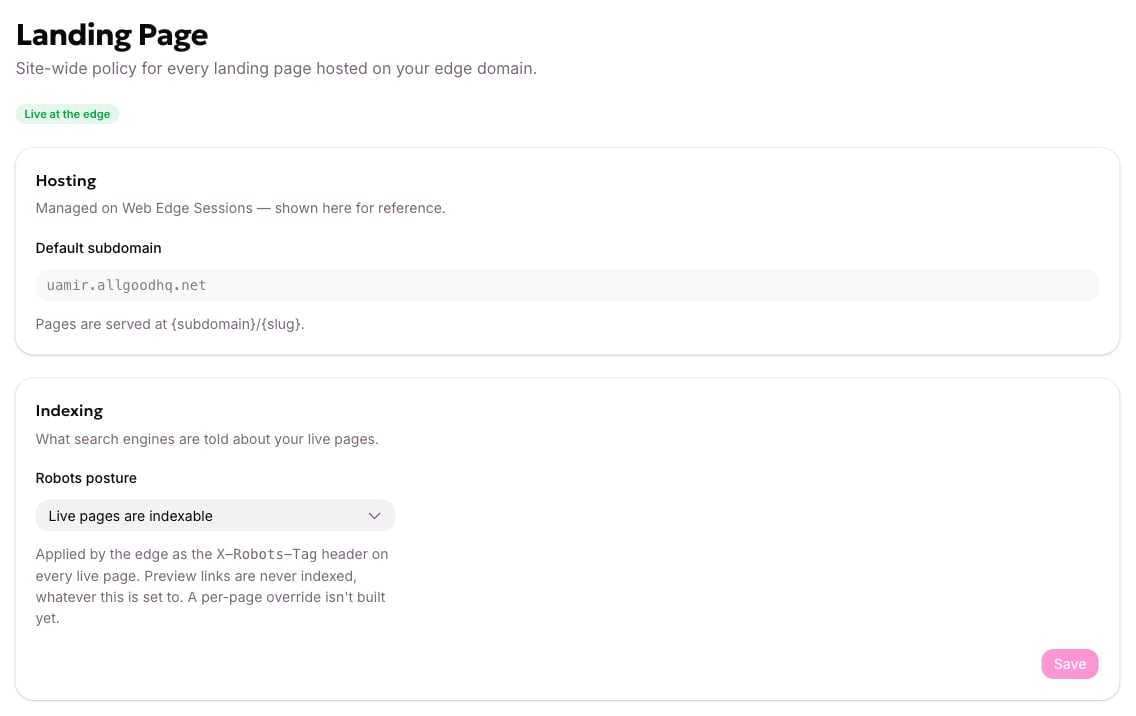
The **Hosting** card shows your **Default subdomain** — for example, `demo.allgoodhq.net`. This field is read-only here; it's managed on [Web Edge Sessions](/mk/settings/web-edge/sessions-setup), and shown on this page for reference. Every landing page you publish is served at `{subdomain}/{slug}`, so the slug you give a page determines its URL under that subdomain.
## Control what search engines see
The **Indexing** card's **Robots posture** setting tells search engines whether your live landing pages should show up in search results. allGood applies your choice as the `X-Robots-Tag` header on every live page. That means it takes effect without you touching a single page's code.
 Open **Landing Page** in your account settings.
Under **Indexing**, open **Robots posture** and choose the option that matches whether you want your live landing pages found in search results.
Click **Save**.
Preview links are never indexed, no matter what Robots posture is set to. This setting only affects pages that are live. A per-page override isn't available yet — one posture applies to every landing page on your domain.
Once saved, the new posture is now active. Every live landing page's `X-Robots-Tag` header reflects it right away, and a new entry appears in your change history below.
## Review your change history
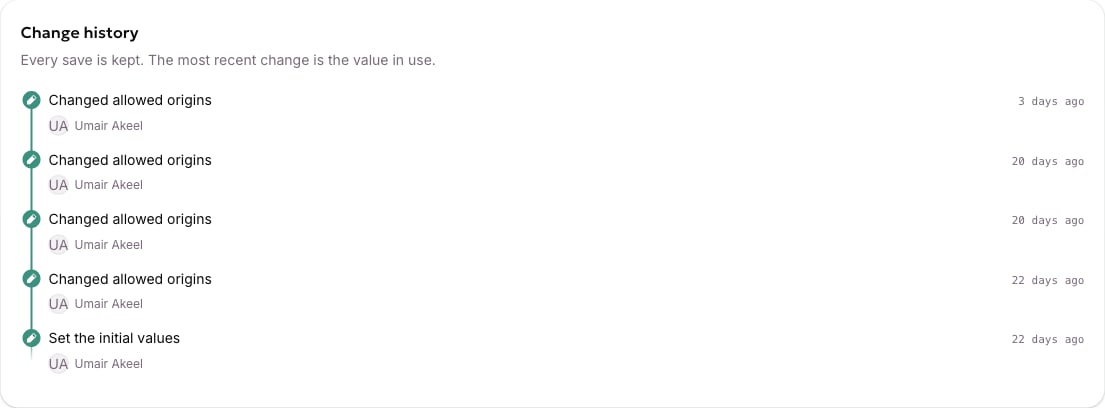
The **Change history** card keeps every save you've made to this page. The most recent one is the value currently in use. Before you've changed anything, it shows **No changes yet — these settings are still at their defaults**. Use it to confirm what a policy used to be, or when it last changed, without asking around.
Open **Landing Page** in your account settings.
Under **Indexing**, open **Robots posture** and choose the option that matches whether you want your live landing pages found in search results.
Click **Save**.
Preview links are never indexed, no matter what Robots posture is set to. This setting only affects pages that are live. A per-page override isn't available yet — one posture applies to every landing page on your domain.
Once saved, the new posture is now active. Every live landing page's `X-Robots-Tag` header reflects it right away, and a new entry appears in your change history below.
## Review your change history
The **Change history** card keeps every save you've made to this page. The most recent one is the value currently in use. Before you've changed anything, it shows **No changes yet — these settings are still at their defaults**. Use it to confirm what a policy used to be, or when it last changed, without asking around.
 If the issue doesn't resolve after saving, see the [Web Edge FAQ](/mk/settings/web-edge/faq).
## Related articles
* [Set up Web Edge Sessions for your site](/mk/settings/web-edge/sessions-setup)
* [Web Edge FAQ](/mk/settings/web-edge/faq)
* Create a landing page (TBD)
* Need the page-config API or slug-routing internals? See the developer reference: [Landing page settings](/mk/developer/web-edge/landing-page-settings)
If the issue doesn't resolve after saving, see the [Web Edge FAQ](/mk/settings/web-edge/faq).
## Related articles
* [Set up Web Edge Sessions for your site](/mk/settings/web-edge/sessions-setup)
* [Web Edge FAQ](/mk/settings/web-edge/faq)
* Create a landing page (TBD)
* Need the page-config API or slug-routing internals? See the developer reference: [Landing page settings](/mk/developer/web-edge/landing-page-settings)