> ## Documentation Index
> Fetch the complete documentation index at: https://docs.allgoodhq.com/llms.txt
> Use this file to discover all available pages before exploring further.
# Share allGood data with your warehouse
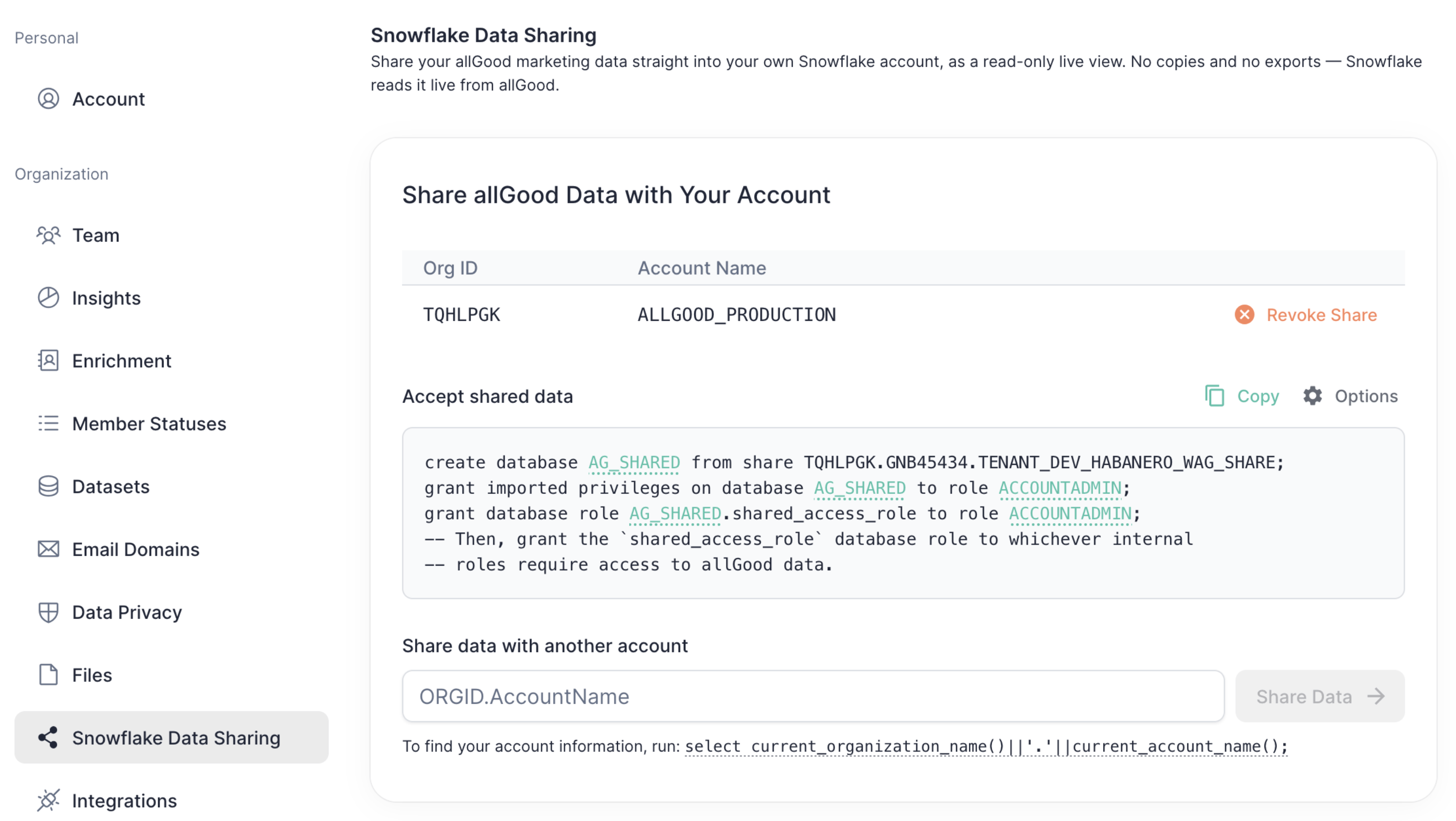 Outbound sharing gives your Snowflake account a read-only, live view of your allGood data. Once it's set up, your analysts query allGood's entities, records and activity history from your own warehouse, joined against whatever else you have there.
Setting it up is two halves: you tell allGood which Snowflake account to share with, then you run a short script in that account to mount the share as a database.
## Before you start
* You need the **Admin** role in allGood to reach the Snowflake Data Sharing settings.
* You need **ACCOUNTADMIN** (or another role that can create databases and grant database roles) in the Snowflake account receiving the data.
* Your Snowflake account must be in the same cloud region as your allGood account. If it isn't, contact allGood before you begin.
In allGood, go to **Settings → Snowflake Data Sharing**.
If you haven't shared with anyone yet, the page shows a single field asking for an account ID. Otherwise it lists the accounts already receiving data.
allGood identifies your warehouse by its account ID — your organization name and account name joined by a dot, like `ACMEORG.ANALYTICS_PROD`.
Run this in the Snowflake account you want the data in:
```sql theme={null}
select current_organization_name()||'.'||current_account_name();
```
Copy the single value it returns.
This is **not** the same as your account *locator* (the eight-character code like `AB12345` that appears in some Snowflake URLs). The two look alike, and a locator will not work — it fails as though the share doesn't exist. Always use the query above.
Paste the account ID into **Share data with another account** and click **Share Data**.
The account appears in the table at the top of the page, split into its **Org ID** and **Account Name**. To share with more than one Snowflake account — a production warehouse and a sandbox, say — repeat this step for each one.
Under **Accept shared data**, click **Copy**. Paste the script into an SQL console and execute it as `ACCOUNTADMIN` (or another sufficiently-privileged role) to accept the data share.
The script names a database (`ALLGOOD_SHARED_DATA` by default) and a role (`ACCOUNTADMIN`) to grant access to. To change either, click **⚙ Options** — or click the underlined values in the script itself. The database exists only in your account, so you can call it whatever fits your naming conventions.
The script grants access to whichever single role you chose. To let your analysts query the data, grant the shared database role onward to their roles:
```sql theme={null}
grant database role ALLGOOD_SHARED_DATA.SHARED_ACCESS_ROLE to role YOUR_ANALYST_ROLE_HERE;
```
Query one of the shared views:
```sql theme={null}
select count(*) from ALLGOOD_SHARED_DATA.MK_SHARE.ENTITY;
```
If you get a row count, you're done. If the database looks empty, check that you ran the third statement in step 5 and that you're querying as a role that holds `SHARED_ACCESS_ROLE`.
## Revoking access
To stop sharing with an account, click **Revoke Share** on its row in the table and confirm.
Revocation is immediate. Queries running against the shared database in that account stop returning rows, and the database has to be recreated with the script above if you later share with the same account again. Other accounts are unaffected.
## Data Schema
Shared data lives in the `MK_SHARE` schema and is organized around four views.
allGood's data model separates *who someone is* from *what you know about them* and *what they did*. **Entities** are resolved people and companies. **Records** are typed sets of fields attached to an entity — one record per source or per kind of fact. **Activities** are behavioural events. And every field change ever applied is kept as an auditable **data change**, along with the explanation of why it was made.
### `MK_SHARE.ENTITY`
One row per resolved entity.
| Column | Type | Description |
| --------------- | --------------- | ----------------------------------------------------------------------------------------------------------------------------------------- |
| `id` | `UUID` | Stable entity identifier. |
| `entity_type` | `VARCHAR` | Which kind of entity this is, from the entity types configured for your account. |
| `created_at` | `TIMESTAMP_NTZ` | When the entity first appeared. |
| `updated_at` | `TIMESTAMP_NTZ` | When the entity was last touched. |
| `superseded_by` | `UUID` | `NULL` for a live entity. When identity resolution merges two entities, the merged-away one remains queryable and points at the survivor. |
### `MK_SHARE.RECORD`
One row per record, holding its current field values.
| Column | Type | Description |
| ----------------------- | --------------- | --------------------------------------------------------------------------------------------------------------- |
| `id` | `UUID` | Stable record identifier. |
| `type` | `VARCHAR` | Which kind of record this is, from the record types configured for your account. |
| `entity_id` | `UUID` | The entity this record currently belongs to. Join to `ENTITY.id`. |
| `data` | `VARIANT` | The record's current field values, as a flat JSON object. |
| `created_at` | `TIMESTAMP_NTZ` | When the record first appeared. |
| `updated_at` | `TIMESTAMP_NTZ` | When the record was last changed. |
| `first_reloc_entity_id` | `UUID` | The first entity this record was attached to. Differs from `entity_id` when identity resolution later moved it. |
### `MK_SHARE.ACTIVITY`
One row per behavioural event.
| Column | Type | Description |
| ------------- | --------------- | ---------------------------------------------------------------------------- |
| `id` | `UUID` | Stable activity identifier. |
| `type` | `VARCHAR` | The kind of activity — an email open, a page view, a form submit, and so on. |
| `occurred_at` | `TIMESTAMP_NTZ` | When the activity happened, as reported by its source. |
| `data` | `VARIANT` | Payload for that activity type. |
| `created_at` | `TIMESTAMP_NTZ` | When allGood received the activity. |
Activities are deliberately not attached to an entity. They arrive at high volume and are matched to entities downstream, so to attribute activity to a person, join through the records that allGood derives from them rather than expecting an `entity_id` here.
### `MK_SHARE.DATA_CHANGE`
An append-only log of every field change ever applied to a record — the audit trail behind everything in `RECORD`.
| Column | Type | Description |
| ------------- | --------------- | -------------------------------------------------------------------------------------------------------- |
| `record_id` | `UUID` | The record that changed. Join to `RECORD.id`. |
| `data_change` | `VARIANT` | What changed, as a flat JSON object of field to new value. |
| `message` | `VARCHAR` | Why the change was made, in plain language, written by the agent or service that made it. May be `NULL`. |
| `applied_at` | `TIMESTAMP_NTZ` | When the change was applied. |
Changes that only re-attached a record to a different entity carry no field change, and are left out of this view.
### Working with the data
Fields inside a `VARIANT` are read with Snowflake's path syntax, and should be cast to the type you expect:
```sql theme={null}
select
e.id as entity_id,
r.data:email::varchar as email,
r.data:company_name::varchar as company
from ALLGOOD_SHARED_DATA.MK_SHARE.ENTITY e
join ALLGOOD_SHARED_DATA.MK_SHARE.RECORD r
on r.entity_id = e.id
where true
and e.superseded_by is null
and r.type = 'person';
```
To read the reasoning behind recent changes to a record:
```sql theme={null}
select record_id, applied_at, data_change, message
from ALLGOOD_SHARED_DATA.MK_SHARE.DATA_CHANGE
order by applied_at desc
limit 100;
```
A few things worth knowing:
Identity resolution merges entities as it learns more, and the merged-away entity stays in `ENTITY` so that old IDs keep resolving. Add `where superseded_by is null` for a list of live entities only, or follow `superseded_by` to find where an old ID ended up.
Sharing requires secure views, which is what keeps the underlying data inaccessible. Snowflake restricts some query optimizations against them, so expect them to be slower than an equivalent local table. If you're running heavy or repeated analysis, materialize what you need into a table in your own account first.
`ACTIVITY` and `DATA_CHANGE` are append-only and current as of the moment you query. `ENTITY` and `RECORD` are rollups that allGood refreshes as it processes data, so they can trail the change log slightly.
allGood's tables carry internal sequence numbers used for ordering and change tracking. They're meaningless outside the platform and are excluded from these views.
Outbound sharing gives your Snowflake account a read-only, live view of your allGood data. Once it's set up, your analysts query allGood's entities, records and activity history from your own warehouse, joined against whatever else you have there.
Setting it up is two halves: you tell allGood which Snowflake account to share with, then you run a short script in that account to mount the share as a database.
## Before you start
* You need the **Admin** role in allGood to reach the Snowflake Data Sharing settings.
* You need **ACCOUNTADMIN** (or another role that can create databases and grant database roles) in the Snowflake account receiving the data.
* Your Snowflake account must be in the same cloud region as your allGood account. If it isn't, contact allGood before you begin.
In allGood, go to **Settings → Snowflake Data Sharing**.
If you haven't shared with anyone yet, the page shows a single field asking for an account ID. Otherwise it lists the accounts already receiving data.
allGood identifies your warehouse by its account ID — your organization name and account name joined by a dot, like `ACMEORG.ANALYTICS_PROD`.
Run this in the Snowflake account you want the data in:
```sql theme={null}
select current_organization_name()||'.'||current_account_name();
```
Copy the single value it returns.
This is **not** the same as your account *locator* (the eight-character code like `AB12345` that appears in some Snowflake URLs). The two look alike, and a locator will not work — it fails as though the share doesn't exist. Always use the query above.
Paste the account ID into **Share data with another account** and click **Share Data**.
The account appears in the table at the top of the page, split into its **Org ID** and **Account Name**. To share with more than one Snowflake account — a production warehouse and a sandbox, say — repeat this step for each one.
Under **Accept shared data**, click **Copy**. Paste the script into an SQL console and execute it as `ACCOUNTADMIN` (or another sufficiently-privileged role) to accept the data share.
The script names a database (`ALLGOOD_SHARED_DATA` by default) and a role (`ACCOUNTADMIN`) to grant access to. To change either, click **⚙ Options** — or click the underlined values in the script itself. The database exists only in your account, so you can call it whatever fits your naming conventions.
The script grants access to whichever single role you chose. To let your analysts query the data, grant the shared database role onward to their roles:
```sql theme={null}
grant database role ALLGOOD_SHARED_DATA.SHARED_ACCESS_ROLE to role YOUR_ANALYST_ROLE_HERE;
```
Query one of the shared views:
```sql theme={null}
select count(*) from ALLGOOD_SHARED_DATA.MK_SHARE.ENTITY;
```
If you get a row count, you're done. If the database looks empty, check that you ran the third statement in step 5 and that you're querying as a role that holds `SHARED_ACCESS_ROLE`.
## Revoking access
To stop sharing with an account, click **Revoke Share** on its row in the table and confirm.
Revocation is immediate. Queries running against the shared database in that account stop returning rows, and the database has to be recreated with the script above if you later share with the same account again. Other accounts are unaffected.
## Data Schema
Shared data lives in the `MK_SHARE` schema and is organized around four views.
allGood's data model separates *who someone is* from *what you know about them* and *what they did*. **Entities** are resolved people and companies. **Records** are typed sets of fields attached to an entity — one record per source or per kind of fact. **Activities** are behavioural events. And every field change ever applied is kept as an auditable **data change**, along with the explanation of why it was made.
### `MK_SHARE.ENTITY`
One row per resolved entity.
| Column | Type | Description |
| --------------- | --------------- | ----------------------------------------------------------------------------------------------------------------------------------------- |
| `id` | `UUID` | Stable entity identifier. |
| `entity_type` | `VARCHAR` | Which kind of entity this is, from the entity types configured for your account. |
| `created_at` | `TIMESTAMP_NTZ` | When the entity first appeared. |
| `updated_at` | `TIMESTAMP_NTZ` | When the entity was last touched. |
| `superseded_by` | `UUID` | `NULL` for a live entity. When identity resolution merges two entities, the merged-away one remains queryable and points at the survivor. |
### `MK_SHARE.RECORD`
One row per record, holding its current field values.
| Column | Type | Description |
| ----------------------- | --------------- | --------------------------------------------------------------------------------------------------------------- |
| `id` | `UUID` | Stable record identifier. |
| `type` | `VARCHAR` | Which kind of record this is, from the record types configured for your account. |
| `entity_id` | `UUID` | The entity this record currently belongs to. Join to `ENTITY.id`. |
| `data` | `VARIANT` | The record's current field values, as a flat JSON object. |
| `created_at` | `TIMESTAMP_NTZ` | When the record first appeared. |
| `updated_at` | `TIMESTAMP_NTZ` | When the record was last changed. |
| `first_reloc_entity_id` | `UUID` | The first entity this record was attached to. Differs from `entity_id` when identity resolution later moved it. |
### `MK_SHARE.ACTIVITY`
One row per behavioural event.
| Column | Type | Description |
| ------------- | --------------- | ---------------------------------------------------------------------------- |
| `id` | `UUID` | Stable activity identifier. |
| `type` | `VARCHAR` | The kind of activity — an email open, a page view, a form submit, and so on. |
| `occurred_at` | `TIMESTAMP_NTZ` | When the activity happened, as reported by its source. |
| `data` | `VARIANT` | Payload for that activity type. |
| `created_at` | `TIMESTAMP_NTZ` | When allGood received the activity. |
Activities are deliberately not attached to an entity. They arrive at high volume and are matched to entities downstream, so to attribute activity to a person, join through the records that allGood derives from them rather than expecting an `entity_id` here.
### `MK_SHARE.DATA_CHANGE`
An append-only log of every field change ever applied to a record — the audit trail behind everything in `RECORD`.
| Column | Type | Description |
| ------------- | --------------- | -------------------------------------------------------------------------------------------------------- |
| `record_id` | `UUID` | The record that changed. Join to `RECORD.id`. |
| `data_change` | `VARIANT` | What changed, as a flat JSON object of field to new value. |
| `message` | `VARCHAR` | Why the change was made, in plain language, written by the agent or service that made it. May be `NULL`. |
| `applied_at` | `TIMESTAMP_NTZ` | When the change was applied. |
Changes that only re-attached a record to a different entity carry no field change, and are left out of this view.
### Working with the data
Fields inside a `VARIANT` are read with Snowflake's path syntax, and should be cast to the type you expect:
```sql theme={null}
select
e.id as entity_id,
r.data:email::varchar as email,
r.data:company_name::varchar as company
from ALLGOOD_SHARED_DATA.MK_SHARE.ENTITY e
join ALLGOOD_SHARED_DATA.MK_SHARE.RECORD r
on r.entity_id = e.id
where true
and e.superseded_by is null
and r.type = 'person';
```
To read the reasoning behind recent changes to a record:
```sql theme={null}
select record_id, applied_at, data_change, message
from ALLGOOD_SHARED_DATA.MK_SHARE.DATA_CHANGE
order by applied_at desc
limit 100;
```
A few things worth knowing:
Identity resolution merges entities as it learns more, and the merged-away entity stays in `ENTITY` so that old IDs keep resolving. Add `where superseded_by is null` for a list of live entities only, or follow `superseded_by` to find where an old ID ended up.
Sharing requires secure views, which is what keeps the underlying data inaccessible. Snowflake restricts some query optimizations against them, so expect them to be slower than an equivalent local table. If you're running heavy or repeated analysis, materialize what you need into a table in your own account first.
`ACTIVITY` and `DATA_CHANGE` are append-only and current as of the moment you query. `ENTITY` and `RECORD` are rollups that allGood refreshes as it processes data, so they can trail the change log slightly.
allGood's tables carry internal sequence numbers used for ordering and change tracking. They're meaningless outside the platform and are excluded from these views.