> ## Documentation Index
> Fetch the complete documentation index at: https://docs.allgoodhq.com/llms.txt
> Use this file to discover all available pages before exploring further.

# Add Mary Instructions

## Overview

You can tell Mary how you want to process your tokens. Mary will read “Mary instructions” and try to follow them.

There are some use cases:

* Append UTM parameters in every link

* Remove “https\://” or specific text in the brief doc.

* Validate specific token values

# Add document-level instructions

For example, add “Mary instructions” sections like this example.
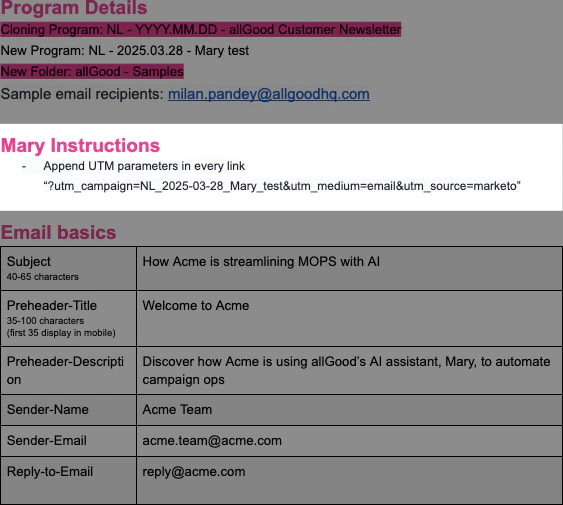
<Frame caption="Added Mary Instructions section">
  <img src="https://mintcdn.com/allgoodtechnologyinc/Ch_ZZInnFMnauFYj/images/use-cases/email-builder/feature-add-mary-instructions/media/image4.png?fit=max&auto=format&n=Ch_ZZInnFMnauFYj&q=85&s=d5949c51a521c972cb6cecbe44241e71" alt="Added Mary Instructions section" width="563" height="505" data-path="images/use-cases/email-builder/feature-add-mary-instructions/media/image4.png" />
</Frame>

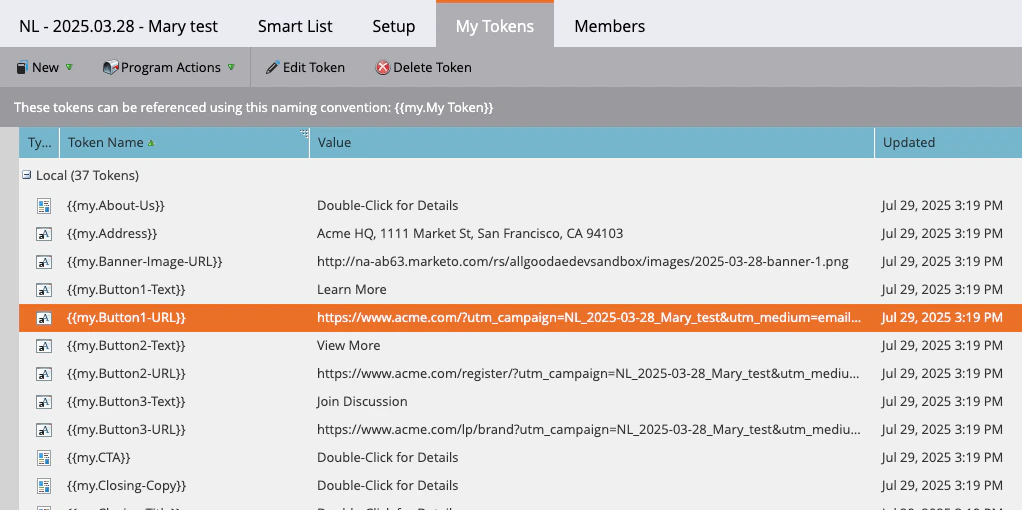
<Frame caption="Mary appended the UTM parameters on URLs">
  <img src="https://mintcdn.com/allgoodtechnologyinc/Ch_ZZInnFMnauFYj/images/use-cases/email-builder/feature-add-mary-instructions/media/image2.png?fit=max&auto=format&n=Ch_ZZInnFMnauFYj&q=85&s=a16d171166c6f524d829f048e7fa9c2f" alt="Mary appended the UTM parameters on URLs" width="1022" height="510" data-path="images/use-cases/email-builder/feature-add-mary-instructions/media/image2.png" />
</Frame>

# Add token-level instructions

You can add Mary instruction on the token level like this as well.
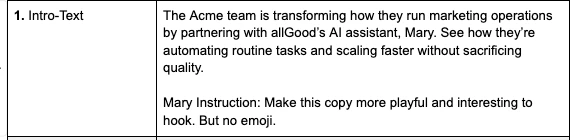
<Frame caption="Added Mary instruction on Intro-Text">
  <img src="https://mintcdn.com/allgoodtechnologyinc/Ch_ZZInnFMnauFYj/images/use-cases/email-builder/feature-add-mary-instructions/media/image1.png?fit=max&auto=format&n=Ch_ZZInnFMnauFYj&q=85&s=61d256bdee17a171658f793ae2d57bbd" alt="Added Mary instruction on Intro-Text" width="570" height="140" data-path="images/use-cases/email-builder/feature-add-mary-instructions/media/image1.png" />
</Frame>

*Note: Marketo does not support emojis.*

<Frame caption="Mary updated Intro-Text more interesting">
  <img src="https://mintcdn.com/allgoodtechnologyinc/Ch_ZZInnFMnauFYj/images/use-cases/email-builder/feature-add-mary-instructions/media/image3.png?fit=max&auto=format&n=Ch_ZZInnFMnauFYj&q=85&s=68ce634aa07bbfad05d6e8ae53363c67" alt="Mary updated Intro-Text more interesting" width="767" height="137" data-path="images/use-cases/email-builder/feature-add-mary-instructions/media/image3.png" />
</Frame>