> ## Documentation Index
> Fetch the complete documentation index at: https://docs.allgoodhq.com/llms.txt
> Use this file to discover all available pages before exploring further.
# Eloqua Actions
> What Mary does after she classifies a reply — Eloqua contact updates, shared list adds, and native unsubscribes.
**Actions** are what Mary *does* once she's classified a reply and pulled out any [extracted data](/erm/data-extraction). They run automatically the moment a match is confirmed, so by the time an email shows up in the [Messages](/erm/messages) feed, the downstream work in Eloqua is already done.
Actions are configured per category. A reply that lands in `Unsubscribe` runs one set of actions; one that lands in `Left Company` runs another.
## Available action types
### Sync Contact to Eloqua
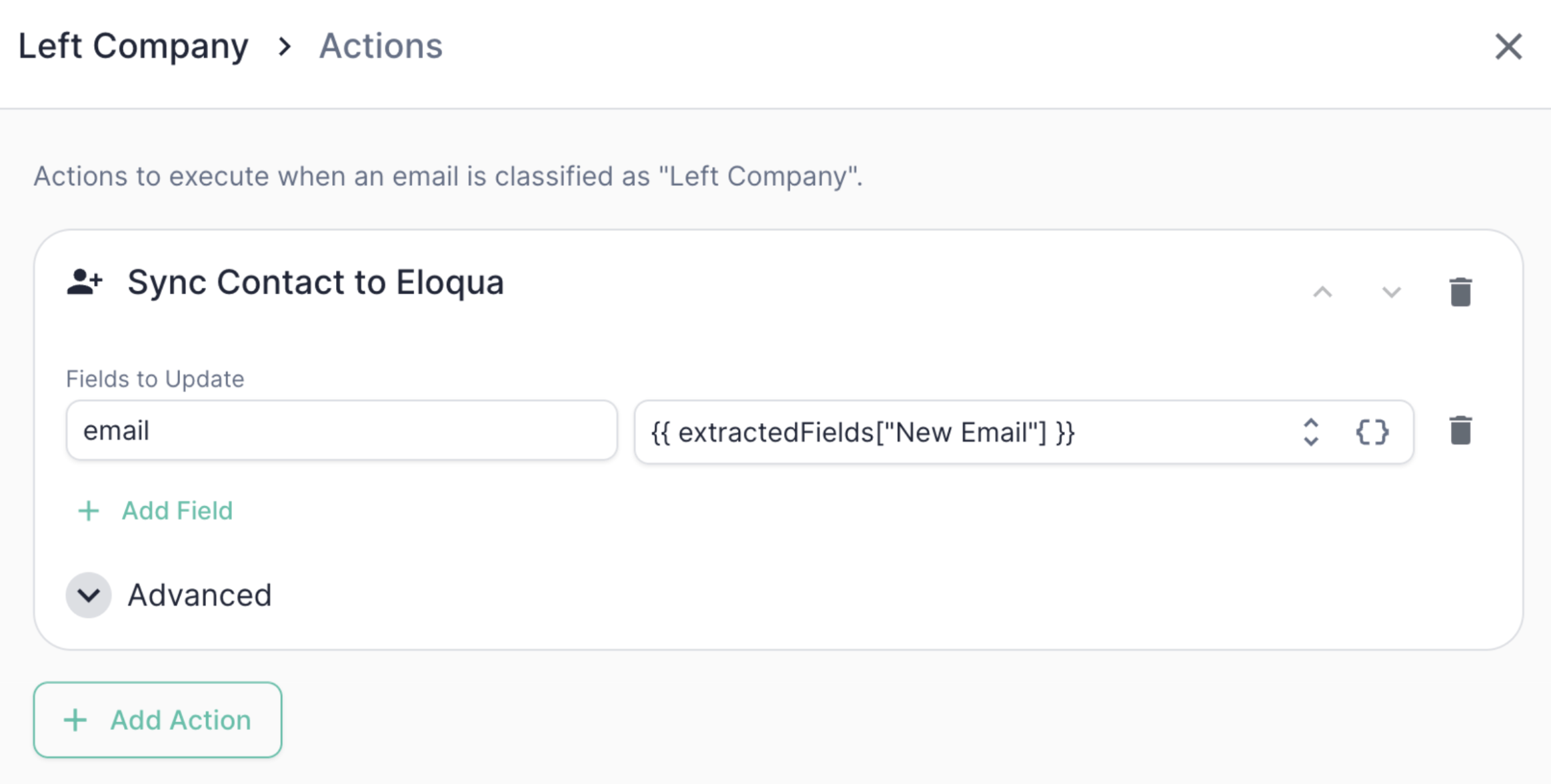 Create or update a contact record in Eloqua, identified by the sender's email address. Mary looks the contact up by email, then creates or updates it depending on the sync mode you choose.
You can set:
* **Static values** — e.g., `leadStatus = Subscriber`
* **Dynamic values** — tokens that resolve at runtime from Mary's classification or [extracted data](/erm/data-extraction), e.g., `leadStatus = [allGood] {{ classification }}`
Each row in the **field map** pairs an Eloqua contact field's internal name with a value or token. The email address is always included automatically — it's the lookup key.
You also choose a **sync mode** under the advanced tab:
| Mode | Behavior |
| ------------------ | ----------------------------------------------------------------------- |
| `Create or Update` | Update the contact if it exists, otherwise create it (the safe default) |
| `Create Only` | Create a new contact; fail if one already exists for that email |
| `Update Only` | Update an existing contact; fail (or skip) if no contact is found |
Common tokens you can reference:
| Token | What it resolves to |
| ---------------------------------- | ------------------------------------------------------------------------------ |
| `{{ classification }}` | The category Mary assigned (e.g., `Unsubscribe`) |
| `{{ rationale }}` | Mary's plain-English reasoning for the classification |
| `{{ from.address }}` | The sender's email address |
| `{{ from.name }}` | The sender's display name |
| `{{ extractedFields[""] }}` | Any field defined in [Data Extraction](/erm/data-extraction) for that category |
### Add to Eloqua Shared List
Create or update a contact record in Eloqua, identified by the sender's email address. Mary looks the contact up by email, then creates or updates it depending on the sync mode you choose.
You can set:
* **Static values** — e.g., `leadStatus = Subscriber`
* **Dynamic values** — tokens that resolve at runtime from Mary's classification or [extracted data](/erm/data-extraction), e.g., `leadStatus = [allGood] {{ classification }}`
Each row in the **field map** pairs an Eloqua contact field's internal name with a value or token. The email address is always included automatically — it's the lookup key.
You also choose a **sync mode** under the advanced tab:
| Mode | Behavior |
| ------------------ | ----------------------------------------------------------------------- |
| `Create or Update` | Update the contact if it exists, otherwise create it (the safe default) |
| `Create Only` | Create a new contact; fail if one already exists for that email |
| `Update Only` | Update an existing contact; fail (or skip) if no contact is found |
Common tokens you can reference:
| Token | What it resolves to |
| ---------------------------------- | ------------------------------------------------------------------------------ |
| `{{ classification }}` | The category Mary assigned (e.g., `Unsubscribe`) |
| `{{ rationale }}` | Mary's plain-English reasoning for the classification |
| `{{ from.address }}` | The sender's email address |
| `{{ from.name }}` | The sender's display name |
| `{{ extractedFields[""] }}` | Any field defined in [Data Extraction](/erm/data-extraction) for that category |
### Add to Eloqua Shared List
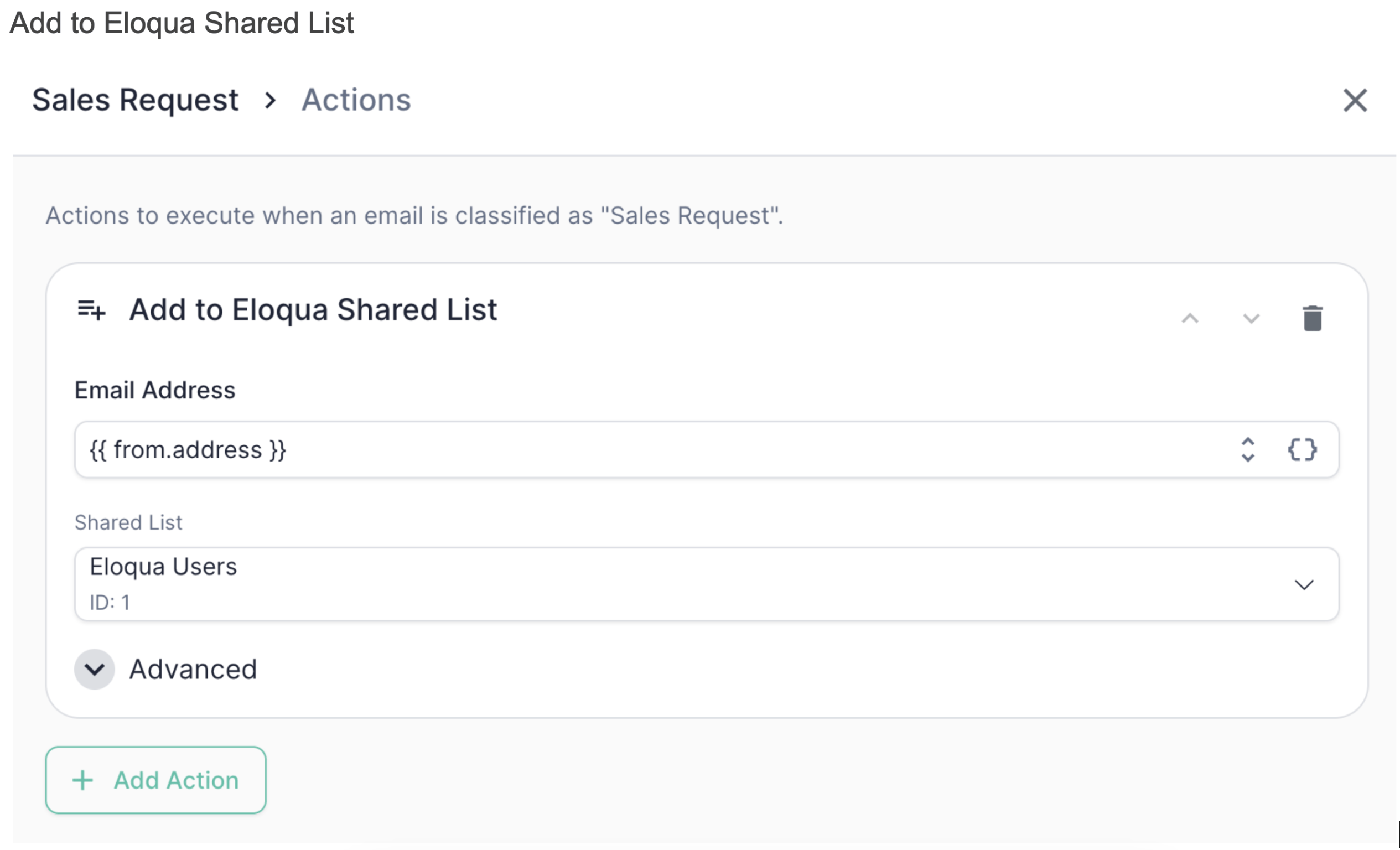 Add the sender's contact to a specific Eloqua shared list. Mary looks the contact up by email and adds them to the list you select. The list is identified by ID, and allGood will display the list name for confirmation once you've picked it from the shared lists in your Eloqua instance.
When adding a contact to an Eloqua shared list, the contact must already exist in Eloqua. If it might not, add a **Sync Contact to Eloqua** action *before* the **Add to Eloqua Shared List** action — the sync (in `Create or Update` mode) will create the contact if it doesn't exist.
### Unsubscribe in Eloqua
Add the sender's contact to a specific Eloqua shared list. Mary looks the contact up by email and adds them to the list you select. The list is identified by ID, and allGood will display the list name for confirmation once you've picked it from the shared lists in your Eloqua instance.
When adding a contact to an Eloqua shared list, the contact must already exist in Eloqua. If it might not, add a **Sync Contact to Eloqua** action *before* the **Add to Eloqua Shared List** action — the sync (in `Create or Update` mode) will create the contact if it doesn't exist.
### Unsubscribe in Eloqua
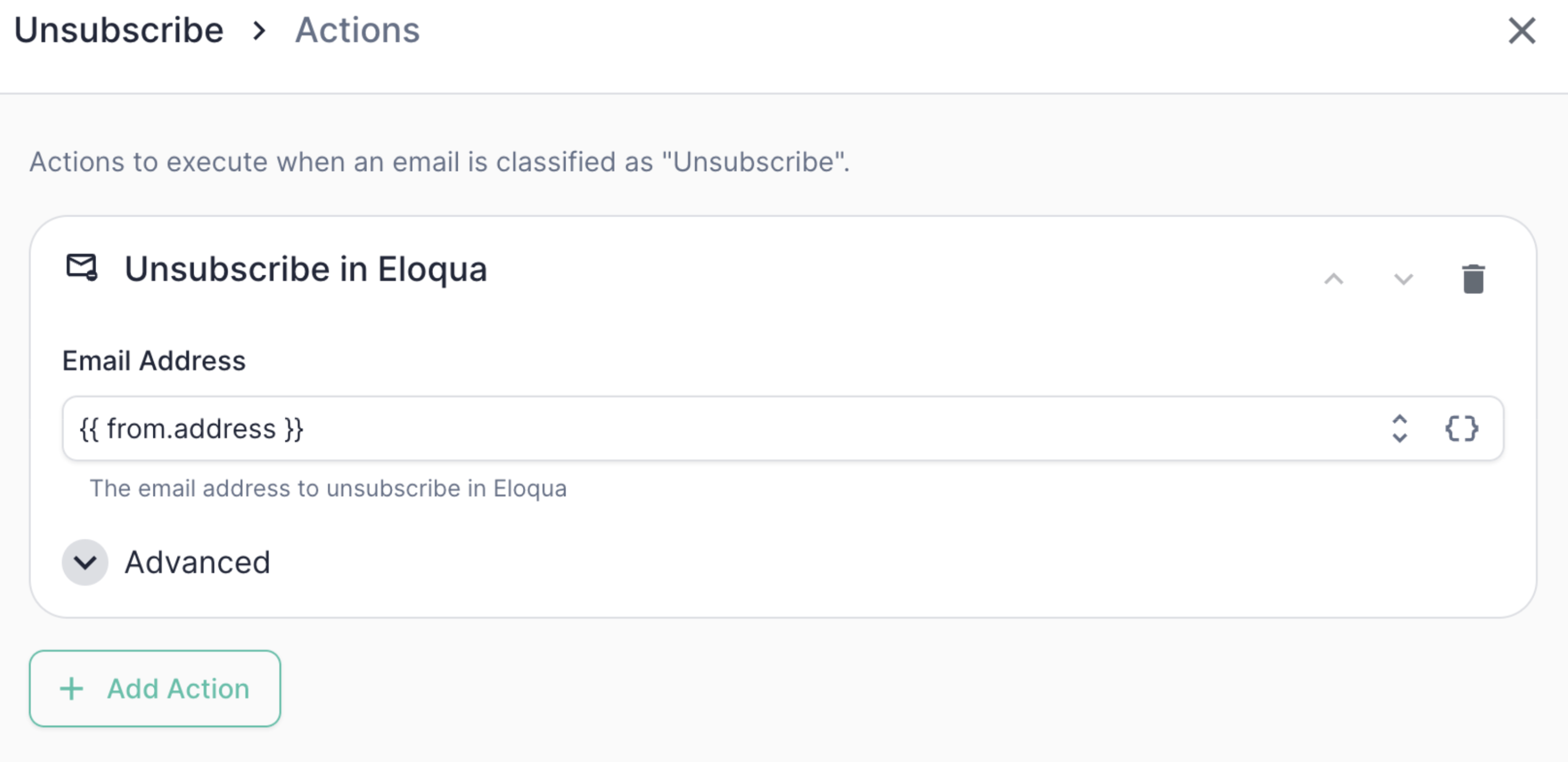 Opt the sender out of email in Eloqua. Mary looks the contact up by email and sets their subscription status to unsubscribed (`isSubscribed = false`). This is the cleanest way to honor an opt-out, because it uses Eloqua's native subscription status rather than just flipping a custom field.
If the contact isn't found in Eloqua, this action skips quietly by default. You can flip this behavior with the **skip if not found** toggle if you'd rather treat a missing contact as a hard error.
## Example: Unsubscribe actions
Opt the sender out of email in Eloqua. Mary looks the contact up by email and sets their subscription status to unsubscribed (`isSubscribed = false`). This is the cleanest way to honor an opt-out, because it uses Eloqua's native subscription status rather than just flipping a custom field.
If the contact isn't found in Eloqua, this action skips quietly by default. You can flip this behavior with the **skip if not found** toggle if you'd rather treat a missing contact as a hard error.
## Example: Unsubscribe actions
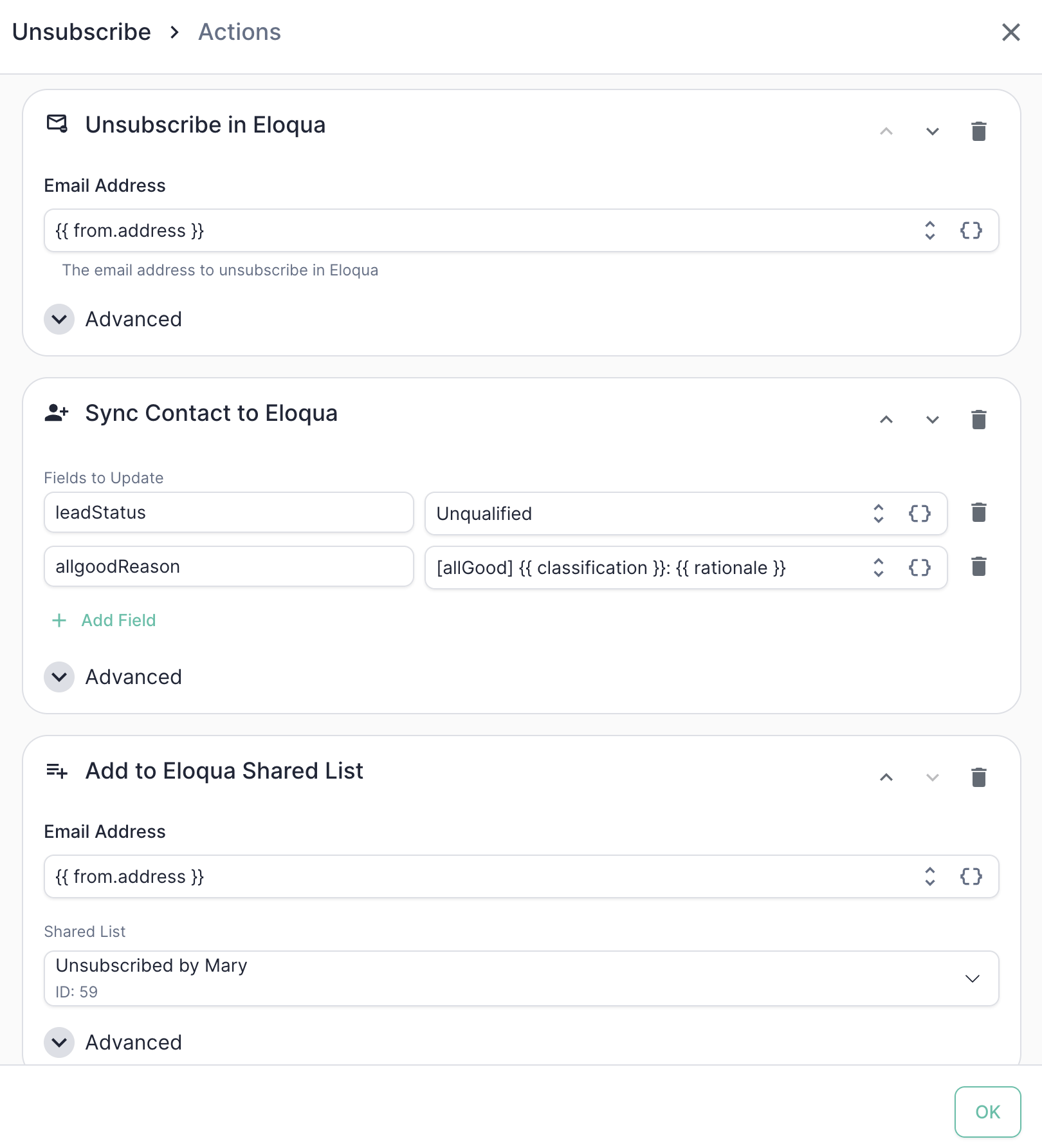 Here's the action chain a typical `Unsubscribe` category would run:
Honor the opt-out using the Unsubscribe in Eloqua action so the suppression is respected everywhere
Record the reason on the contact for the audit trail. Using `Create or Update` mode also guarantees the contact exists before the later steps run.
| Field | Value |
| --------------- | ------------------------------------------------- |
| `leadStatus` | `Unqualified` |
| `allgoodReason` | `[allGood] {{ classification }}: {{ rationale }}` |
Drop the contact into the Mary-managed unsubscribe list for downstream reporting and suppression.
| Field | Value |
| ------------- | ---------------------------------- |
| Email address | `{{ from.address }}` |
| List | `Unsubscribed by Mary` (ID: 19044) |
The `{{ rationale }}` token is particularly useful here — it gives your ops team a human-readable audit trail directly on the contact record explaining *why* Mary marked someone as unsubscribed.
## Stacking and reordering actions
You can configure multiple actions per category, and they run in the order they're listed. Use the up/down arrows on each action row to reorder them. Click **+ Add Action** to add more.
Order matters in two cases:
* **Dependent actions.** If an `Add to Shared List` depends on the contact existing, put `Sync Contact to Eloqua` (in `Create or Update` mode) first.
* **Field dependencies.** If a later action references a field set by an earlier action, make sure the order reflects that dependency.
## Conditional actions
Every action supports an **only-if** condition — a token expression that must evaluate to `true` for the action to run. This lets you fan out behavior within a single category. For example, only add to a "Hot Leads" list when an extracted `intent` field is `high`, while still running the rest of the chain for everyone.
Actions that look a contact up by email also expose a **skip if not found** toggle, which controls whether a missing contact is treated as a quiet skip or a hard error.
## Best practices
* **Use the `[allGood]` prefix in audit fields.** Following the example above (`allgoodReason = [allGood] ...`) makes it easy to see at a glance which records were touched by Mary versus a human or another system.
* **Use field *internal* names, not labels.** The field map keys must be Eloqua's internal contact field names, not the friendly labels shown elsewhere in the UI. A field name that doesn't exist will fail at execution time.
* **Prefer the native unsubscribe.** For opt-outs, use **Unsubscribe in Eloqua** rather than just setting a custom field — it updates Eloqua's subscription status so suppression is honored everywhere.
* **Test the full chain, not just the classification.** The [Test Suite](/erm/test-suite) validates categorization and extraction; once those pass, sanity-check the actions in a sandbox Eloqua instance before going live.
* **Watch the order when adding to lists.** Most shared-list add failures we see are contacts that didn't exist yet. Lead with a **Sync Contact to Eloqua** in `Create or Update` mode to be safe.
Here's the action chain a typical `Unsubscribe` category would run:
Honor the opt-out using the Unsubscribe in Eloqua action so the suppression is respected everywhere
Record the reason on the contact for the audit trail. Using `Create or Update` mode also guarantees the contact exists before the later steps run.
| Field | Value |
| --------------- | ------------------------------------------------- |
| `leadStatus` | `Unqualified` |
| `allgoodReason` | `[allGood] {{ classification }}: {{ rationale }}` |
Drop the contact into the Mary-managed unsubscribe list for downstream reporting and suppression.
| Field | Value |
| ------------- | ---------------------------------- |
| Email address | `{{ from.address }}` |
| List | `Unsubscribed by Mary` (ID: 19044) |
The `{{ rationale }}` token is particularly useful here — it gives your ops team a human-readable audit trail directly on the contact record explaining *why* Mary marked someone as unsubscribed.
## Stacking and reordering actions
You can configure multiple actions per category, and they run in the order they're listed. Use the up/down arrows on each action row to reorder them. Click **+ Add Action** to add more.
Order matters in two cases:
* **Dependent actions.** If an `Add to Shared List` depends on the contact existing, put `Sync Contact to Eloqua` (in `Create or Update` mode) first.
* **Field dependencies.** If a later action references a field set by an earlier action, make sure the order reflects that dependency.
## Conditional actions
Every action supports an **only-if** condition — a token expression that must evaluate to `true` for the action to run. This lets you fan out behavior within a single category. For example, only add to a "Hot Leads" list when an extracted `intent` field is `high`, while still running the rest of the chain for everyone.
Actions that look a contact up by email also expose a **skip if not found** toggle, which controls whether a missing contact is treated as a quiet skip or a hard error.
## Best practices
* **Use the `[allGood]` prefix in audit fields.** Following the example above (`allgoodReason = [allGood] ...`) makes it easy to see at a glance which records were touched by Mary versus a human or another system.
* **Use field *internal* names, not labels.** The field map keys must be Eloqua's internal contact field names, not the friendly labels shown elsewhere in the UI. A field name that doesn't exist will fail at execution time.
* **Prefer the native unsubscribe.** For opt-outs, use **Unsubscribe in Eloqua** rather than just setting a custom field — it updates Eloqua's subscription status so suppression is honored everywhere.
* **Test the full chain, not just the classification.** The [Test Suite](/erm/test-suite) validates categorization and extraction; once those pass, sanity-check the actions in a sandbox Eloqua instance before going live.
* **Watch the order when adding to lists.** Most shared-list add failures we see are contacts that didn't exist yet. Lead with a **Sync Contact to Eloqua** in `Create or Update` mode to be safe.