> ## Documentation Index
> Fetch the complete documentation index at: https://docs.allgoodhq.com/llms.txt
> Use this file to discover all available pages before exploring further.
# Search
> Find specific emails across every processed reply — by sender, body content, category, or any extracted field.
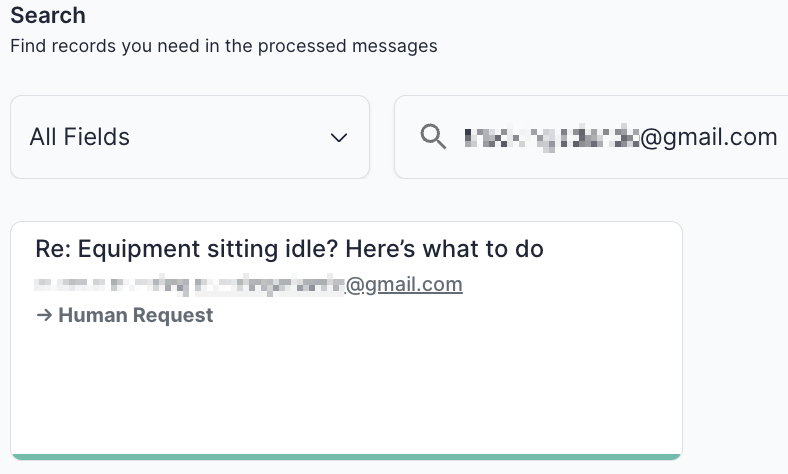
The **Search** page lets you find specific emails across every reply Mary has processed. It's the fastest way to confirm a specific contact's reply was picked up, debug a category that doesn't look right, or audit how Mary handled a particular sender.
 ## How to search
By default, search runs across all indexed fields at once — drop in a keyword, sender name, or phrase and you'll see every email it appears in.
For more targeted queries, use the dropdown to scope your search to a single field.
## Searchable fields
| Field | What you can search |
| ----------------- | ----------------------------------------------------------- |
| `Category` | Filter by classification (e.g., all `Unsubscribe` emails) |
| `from` | Find emails from a specific sender address |
| `body` | Search the full text of the email body |
| `cc` | Find emails where a specific address was CC'd |
| `newContactEmail` | Find emails where a replacement contact email was extracted |
| `newContactName` | Find emails where a replacement contact name was extracted |
| `newEmail` | Find emails where a new email address was extracted |
| `returnDate` | Find Out-Of-Office emails with a specific return date |
| `received_at` | Search by when the email was received |
| `metadata` | Search across message metadata |
Results appear as cards just like the [Messages](/use-cases/erm/messages) feed, and you can click into any result to view the full processing detail.
## Common debugging patterns
A few search workflows that come up regularly:
* **"Did this person's reply get processed?"** Search `from` for the sender's email. If nothing comes up, the reply never reached Mary — check your inbox forwarding rules.
* **"Why was this reply classified that way?"** Find the email, click into it, and review Mary's reasoning in the **Classify Email** section of the detail view.
* **"Is this category over-firing?"** Filter by `Category` and skim the matches. If you see replies that shouldn't be there, tighten the [category prompt](/use-cases/erm/categories) to rule them out — and add the misclassified examples to the [Test Suite](/use-cases/erm/test-suite) as regression checks.
* **"Where did we route the replacements from last quarter's left-company replies?"** Search `newContactEmail` with a date range on `received_at` to pull every extracted replacement contact.
When you find a misclassified email through Search, open it and use the **Re-run** button in the [Messages](/use-cases/erm/messages) detail view to reprocess it against your current configuration — no need to wait for a similar reply to come in.
## How to search
By default, search runs across all indexed fields at once — drop in a keyword, sender name, or phrase and you'll see every email it appears in.
For more targeted queries, use the dropdown to scope your search to a single field.
## Searchable fields
| Field | What you can search |
| ----------------- | ----------------------------------------------------------- |
| `Category` | Filter by classification (e.g., all `Unsubscribe` emails) |
| `from` | Find emails from a specific sender address |
| `body` | Search the full text of the email body |
| `cc` | Find emails where a specific address was CC'd |
| `newContactEmail` | Find emails where a replacement contact email was extracted |
| `newContactName` | Find emails where a replacement contact name was extracted |
| `newEmail` | Find emails where a new email address was extracted |
| `returnDate` | Find Out-Of-Office emails with a specific return date |
| `received_at` | Search by when the email was received |
| `metadata` | Search across message metadata |
Results appear as cards just like the [Messages](/use-cases/erm/messages) feed, and you can click into any result to view the full processing detail.
## Common debugging patterns
A few search workflows that come up regularly:
* **"Did this person's reply get processed?"** Search `from` for the sender's email. If nothing comes up, the reply never reached Mary — check your inbox forwarding rules.
* **"Why was this reply classified that way?"** Find the email, click into it, and review Mary's reasoning in the **Classify Email** section of the detail view.
* **"Is this category over-firing?"** Filter by `Category` and skim the matches. If you see replies that shouldn't be there, tighten the [category prompt](/use-cases/erm/categories) to rule them out — and add the misclassified examples to the [Test Suite](/use-cases/erm/test-suite) as regression checks.
* **"Where did we route the replacements from last quarter's left-company replies?"** Search `newContactEmail` with a date range on `received_at` to pull every extracted replacement contact.
When you find a misclassified email through Search, open it and use the **Re-run** button in the [Messages](/use-cases/erm/messages) detail view to reprocess it against your current configuration — no need to wait for a similar reply to come in.