> ## Documentation Index
> Fetch the complete documentation index at: https://docs.allgoodhq.com/llms.txt
> Use this file to discover all available pages before exploring further.
# Slack Actions
> Post a classified reply straight into Slack — to a channel or as a direct message — with support for @ mentions and tokens.
**Send a Slack Message** is an ERM action, configured per category just like Forward Email or the Marketo actions. The moment a reply is classified into a category with this action attached, Mary posts the message — no manual forwarding, no "get the Slack channel's email address" workaround.
This is a **generic action** — it works the same way regardless of which marketing automation platform you're connected to, and only requires the [Slack integration](/integrations/slack) to be connected under **Settings → Integrations**.
## Configuring the action
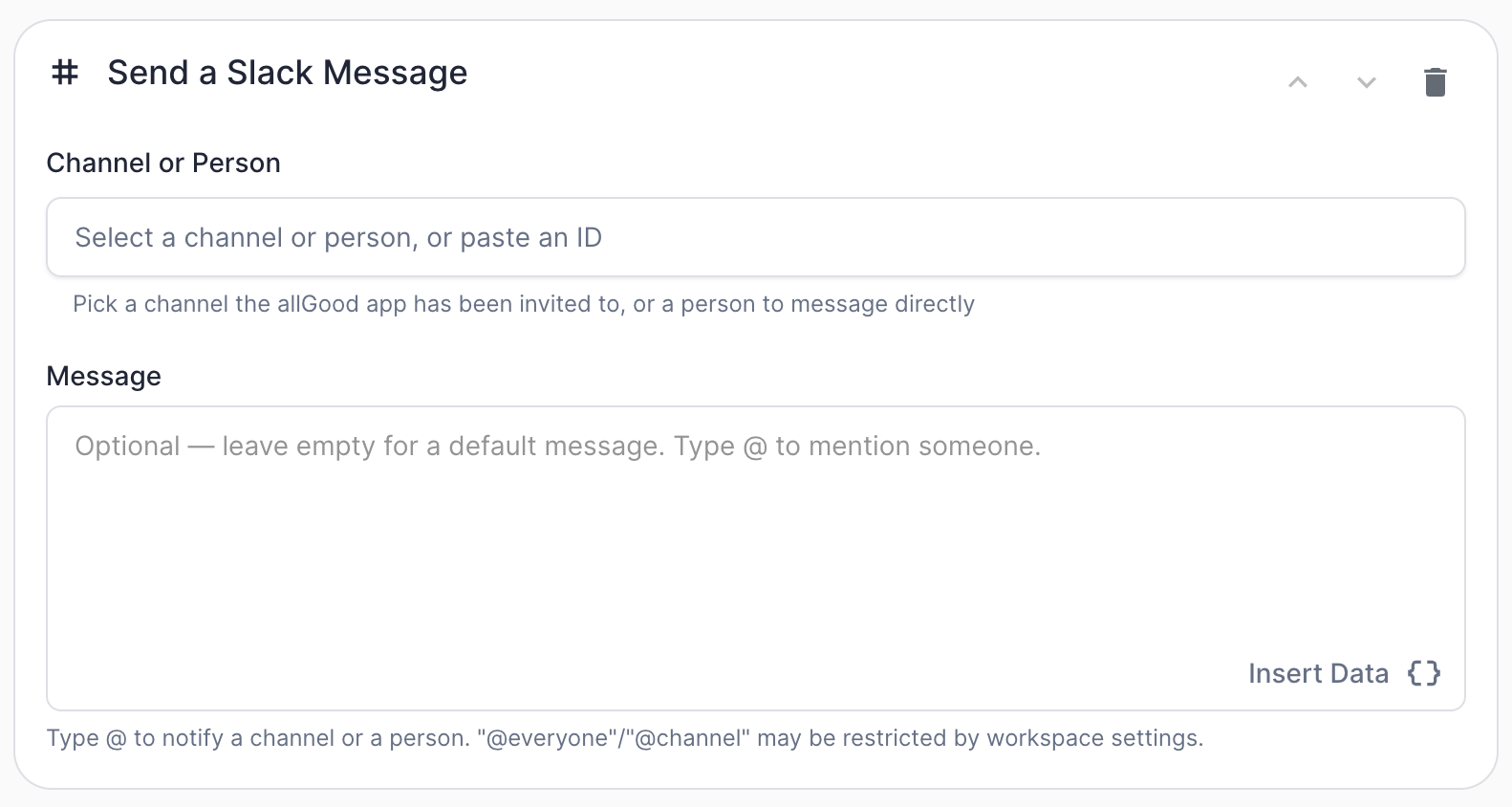 | Field | What it does |
| ------------------- | ----------------------------------------------------------------------------------------------------------------------------------------------------------------------------------------- |
| `Channel or Person` | Where the message goes. Search and pick from a dropdown, or paste a Slack channel or user ID directly. See below. |
| `Message` | The message text. Supports **@ mentions** and token insertion via **Insert Data** (see below). Leave empty to use a default message built from the classification, sender, and rationale. |
### Choosing a destination: channel or direct message
The `Channel or Person` field is a single picker that offers both:
* **Channels** — any channel the allGood Slack app has already been invited to. If a channel you want isn't showing up in the list, invite the app to it first (in Slack, open the channel and `/invite @allGood` or add it via the channel's Integrations tab), then it'll appear in the picker.
* **People** — any active member of your connected Slack workspace. Picking a person sends them a **direct message** — no invite or setup needed on Slack's side. Bots and deactivated accounts are filtered out of the list automatically.
Both channels and people show up in the same searchable dropdown — type a name to filter either kind. You can also paste a raw Slack channel or user ID directly if you already have it (e.g., copied from Slack's "Copy link" option).
Sending a direct message relies on the receiving workspace allowing apps to DM
their members. This is enabled by default, but if a workspace admin has
restricted it, the action will fail with an error explaining that Slack
couldn't deliver to that person — nothing on the allGood side needs to change
in that case.
### @ Mentions
| Field | What it does |
| ------------------- | ----------------------------------------------------------------------------------------------------------------------------------------------------------------------------------------- |
| `Channel or Person` | Where the message goes. Search and pick from a dropdown, or paste a Slack channel or user ID directly. See below. |
| `Message` | The message text. Supports **@ mentions** and token insertion via **Insert Data** (see below). Leave empty to use a default message built from the classification, sender, and rationale. |
### Choosing a destination: channel or direct message
The `Channel or Person` field is a single picker that offers both:
* **Channels** — any channel the allGood Slack app has already been invited to. If a channel you want isn't showing up in the list, invite the app to it first (in Slack, open the channel and `/invite @allGood` or add it via the channel's Integrations tab), then it'll appear in the picker.
* **People** — any active member of your connected Slack workspace. Picking a person sends them a **direct message** — no invite or setup needed on Slack's side. Bots and deactivated accounts are filtered out of the list automatically.
Both channels and people show up in the same searchable dropdown — type a name to filter either kind. You can also paste a raw Slack channel or user ID directly if you already have it (e.g., copied from Slack's "Copy link" option).
Sending a direct message relies on the receiving workspace allowing apps to DM
their members. This is enabled by default, but if a workspace admin has
restricted it, the action will fail with an error explaining that Slack
couldn't deliver to that person — nothing on the allGood side needs to change
in that case.
### @ Mentions
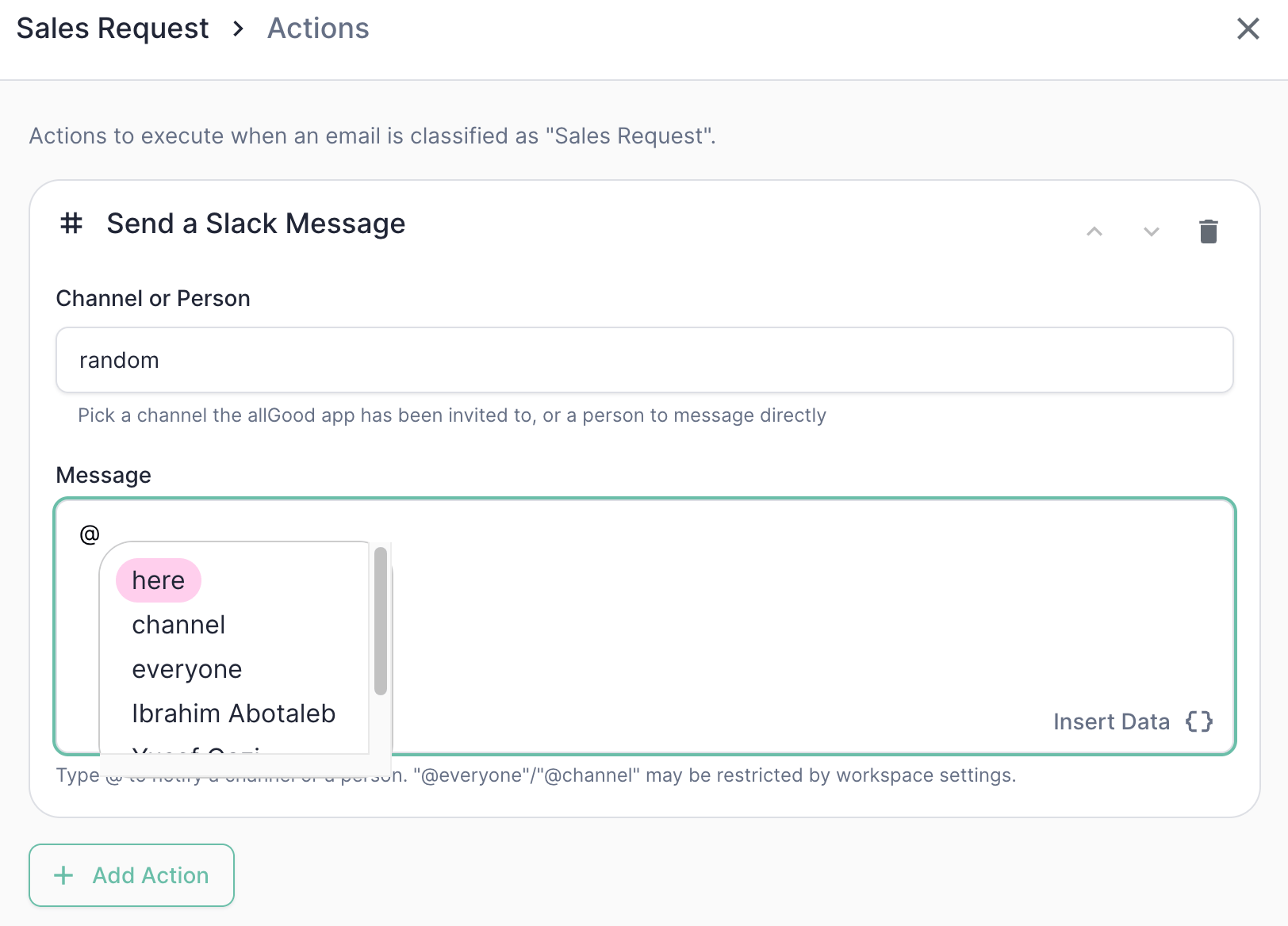 | Typing `@` shows... | Inserts... |
| ------------------------------- | -------------------------------------------------------------------------------------------------------------------------------------------------- |
| `here` / `channel` / `everyone` | A broadcast notification to the channel — pings active members (`here`), everyone in the channel (`channel`), or the whole workspace (`everyone`). |
| A specific person's name | A direct `@mention` that notifies just that person, wherever the message ends up. |
`@everyone` and `@channel` may be restricted by the destination workspace's
own settings — some workspaces limit which apps or roles can trigger a
broadcast notification. If that happens, the mention won't misfire; it just
won't notify as broadly as configured.
### The default message
If you leave **Message** empty, Mary sends a default message built from the reply itself:
```
**
From:
```
For example, a `Sales Request` reply might produce:
```
*Sales Request*
From: Jane Doe
Asked about enterprise pricing and a demo.
```
### Tokens (Insert Data)
Like other action message fields, you can insert tokens via the **Insert Data** button — the same field data available to other actions, including [extracted fields](/use-cases/erm/data-extraction):
| Token | What it resolves to |
| ---------------------------------------- | ------------------------------------------------------ |
| `{{ classification }}` | The category Mary assigned |
| `{{ rationale }}` | Mary's plain-English reasoning for the classification |
| `{{ from.address }}` / `{{ from.name }}` | The sender's email address / display name |
| `{{ subject }}` | The original email's subject line |
| `{{ extractedFields[""] }}` | Any field defined in Data Extraction for that category |
Tokens and @ mentions can be combined freely in the same message — e.g., ` New lead from {{ from.address }} — {{ rationale }}`.
## Example: Sales Request notification
On the `Sales Request` category, add a **Send a Slack Message** action.
| Field | Value |
| ------------------- | ---------------------------------------------------------- |
| `Channel or Person` | `#sales-leads` |
| `Message` | `@here New lead from {{ from.address }} — {{ rationale }}` |
Add a second **Send a Slack Message** action on the same category to also DM a specific person — useful when a category needs both a team-wide heads-up and a direct nudge to whoever owns the account.
| Field | Value |
| ------------------- | -------------------------------------------------------- |
| `Channel or Person` | `Alex Kim` (a person, not a channel) |
| `Message` | `{{ from.name }} replied — take a look: {{ rationale }}` |
Actions run in the order they're listed, same as any other ERM action — see action ordering and conditional (`only if`) behavior in the general [Marketo Actions](/use-cases/erm/marketo-actions) documentation, which apply here the same way they do to Marketo and Forward Email actions.
## Best practices
* **Invite the bot before you need it.** A channel that isn't in the picker almost always means the allGood Slack app hasn't been invited to it yet — invite it in Slack, then it'll show up.
* **Use `@here` over `@channel`/`@everyone` by default.** `@here` only pings people currently active, which is usually what you want for a "heads up, new reply" notification — save the broader broadcasts for things that genuinely need everyone's attention.
* **DM for individual accountability, post to a channel for team visibility.** If a specific person needs to act, a direct message (or an `@mention` inside a channel post) is more likely to get noticed than a channel post alone.
* **Keep messages short.** Slack messages are meant to be skimmed — put the detail Mary extracted in `{{ rationale }}` or a linked worksheet item rather than pasting the entire original email.
| Typing `@` shows... | Inserts... |
| ------------------------------- | -------------------------------------------------------------------------------------------------------------------------------------------------- |
| `here` / `channel` / `everyone` | A broadcast notification to the channel — pings active members (`here`), everyone in the channel (`channel`), or the whole workspace (`everyone`). |
| A specific person's name | A direct `@mention` that notifies just that person, wherever the message ends up. |
`@everyone` and `@channel` may be restricted by the destination workspace's
own settings — some workspaces limit which apps or roles can trigger a
broadcast notification. If that happens, the mention won't misfire; it just
won't notify as broadly as configured.
### The default message
If you leave **Message** empty, Mary sends a default message built from the reply itself:
```
**
From:
```
For example, a `Sales Request` reply might produce:
```
*Sales Request*
From: Jane Doe
Asked about enterprise pricing and a demo.
```
### Tokens (Insert Data)
Like other action message fields, you can insert tokens via the **Insert Data** button — the same field data available to other actions, including [extracted fields](/use-cases/erm/data-extraction):
| Token | What it resolves to |
| ---------------------------------------- | ------------------------------------------------------ |
| `{{ classification }}` | The category Mary assigned |
| `{{ rationale }}` | Mary's plain-English reasoning for the classification |
| `{{ from.address }}` / `{{ from.name }}` | The sender's email address / display name |
| `{{ subject }}` | The original email's subject line |
| `{{ extractedFields[""] }}` | Any field defined in Data Extraction for that category |
Tokens and @ mentions can be combined freely in the same message — e.g., ` New lead from {{ from.address }} — {{ rationale }}`.
## Example: Sales Request notification
On the `Sales Request` category, add a **Send a Slack Message** action.
| Field | Value |
| ------------------- | ---------------------------------------------------------- |
| `Channel or Person` | `#sales-leads` |
| `Message` | `@here New lead from {{ from.address }} — {{ rationale }}` |
Add a second **Send a Slack Message** action on the same category to also DM a specific person — useful when a category needs both a team-wide heads-up and a direct nudge to whoever owns the account.
| Field | Value |
| ------------------- | -------------------------------------------------------- |
| `Channel or Person` | `Alex Kim` (a person, not a channel) |
| `Message` | `{{ from.name }} replied — take a look: {{ rationale }}` |
Actions run in the order they're listed, same as any other ERM action — see action ordering and conditional (`only if`) behavior in the general [Marketo Actions](/use-cases/erm/marketo-actions) documentation, which apply here the same way they do to Marketo and Forward Email actions.
## Best practices
* **Invite the bot before you need it.** A channel that isn't in the picker almost always means the allGood Slack app hasn't been invited to it yet — invite it in Slack, then it'll show up.
* **Use `@here` over `@channel`/`@everyone` by default.** `@here` only pings people currently active, which is usually what you want for a "heads up, new reply" notification — save the broader broadcasts for things that genuinely need everyone's attention.
* **DM for individual accountability, post to a channel for team visibility.** If a specific person needs to act, a direct message (or an `@mention` inside a channel post) is more likely to get noticed than a channel post alone.
* **Keep messages short.** Slack messages are meant to be skimmed — put the detail Mary extracted in `{{ rationale }}` or a linked worksheet item rather than pasting the entire original email.