> ## Documentation Index
> Fetch the complete documentation index at: https://docs.allgoodhq.com/llms.txt
> Use this file to discover all available pages before exploring further.
# Marketo MCP: security, data, and governance
> A technical reference for IT, security, and GRC review of the allGood Marketo MCP — data flow, authentication, per-user attribution, and access controls.
This article is for IT, security, and GRC reviewers evaluating the allGood Marketo MCP before it's approved for use. It answers the questions that come up in a vendor security review or architecture sign-off. For what the connector does day to day, see the [Overview](/use-cases/marketo-mcp/index) and the tool references — [finding and data](/use-cases/marketo-mcp/capabilities), [editing and sending](/use-cases/marketo-mcp/capabilities-editing-emails) — instead. This article covers the Marketo MCP tool surface specifically, plus how allGood's overall security posture applies to it.
## What data flows through it
The Marketo MCP tools read and write Marketo program and email data: programs, folders, tokens, email content and templates, forms, and smart campaign names.
They do not read or write lead or contact records. No lead PII passes through this tool surface.
This scope — and the "no lead PII" statement above — covers the Marketo MCP tools only, listed in the tool references ([finding and data](/use-cases/marketo-mcp/capabilities), [editing and sending](/use-cases/marketo-mcp/capabilities-editing-emails)). Those tools talk to Marketo directly and never route through allGood's own data model.
Worksheets (used for list uploads and similar imports) are a separate tool surface with a different data flow — they exist specifically to move lead and contact data into allGood, and from there, via a worksheet's own steps, potentially into Marketo. They're also governed by their own permissions (View, Use templates, Manage on Worksheets), distinct from the Campaign permissions above. If a review needs to cover worksheets or list upload, treat that as a separate scope: it isn't described by this article.
Processing and hosting for these tools is in AWS us-west-2 (Oregon). That matches allGood's stated data residency for the platform as a whole (see below).
## Authentication and access model
Each person connects with their own allGood account, through their own OAuth session in their AI client (Claude Desktop or ChatGPT Desktop) — not a credential shared across the team. Authentication runs through allGood's identity provider; the connector doesn't request a separate, bespoke set of API scopes the way some third-party integrations do. See [Claude Desktop setup](/use-cases/marketo-mcp/claude-desktop) for what that authorization step looks like.
What actually governs what a person can do is allGood's own permission system, checked on every tool call:
* Looking things up (searching programs, reading emails, checking tokens) requires **View**, **Use**, or **Manage** on Campaigns
* Making changes (updating tokens or tags, editing email content or modules) requires **Use** or **Manage** on Campaigns
* Cloning a program or email requires **Manage** on Campaigns specifically — the most privileged of the three
These are the same campaign permissions that govern the rest of allGood, not a Marketo-specific permission set — so a person's existing role already determines what the MCP will let them do. Separately, the connector only works at all once your tenant has a Marketo integration connected; that's checked independently of any individual user's permissions.
Underneath that, allGood holds one integration credential against Marketo itself. So Marketo's own audit trail records allGood as the actor on every change, not the individual person who requested it. That's exactly what the governance log below is built to solve.
## Per-user governance log
Because Marketo only sees one shared allGood credential, allGood separately records who actually made each change. Every MCP tool call your tenant makes — across the Marketo tools and every other MCP surface — is logged: the tool called, its full arguments, its full result, a timestamp, and the user who made the call.
This is queryable in the product at **Settings → MCP Usage**: a filterable, newest-first table of every call, filterable by user or by tool, with the full argument and result payload for any row available on demand.
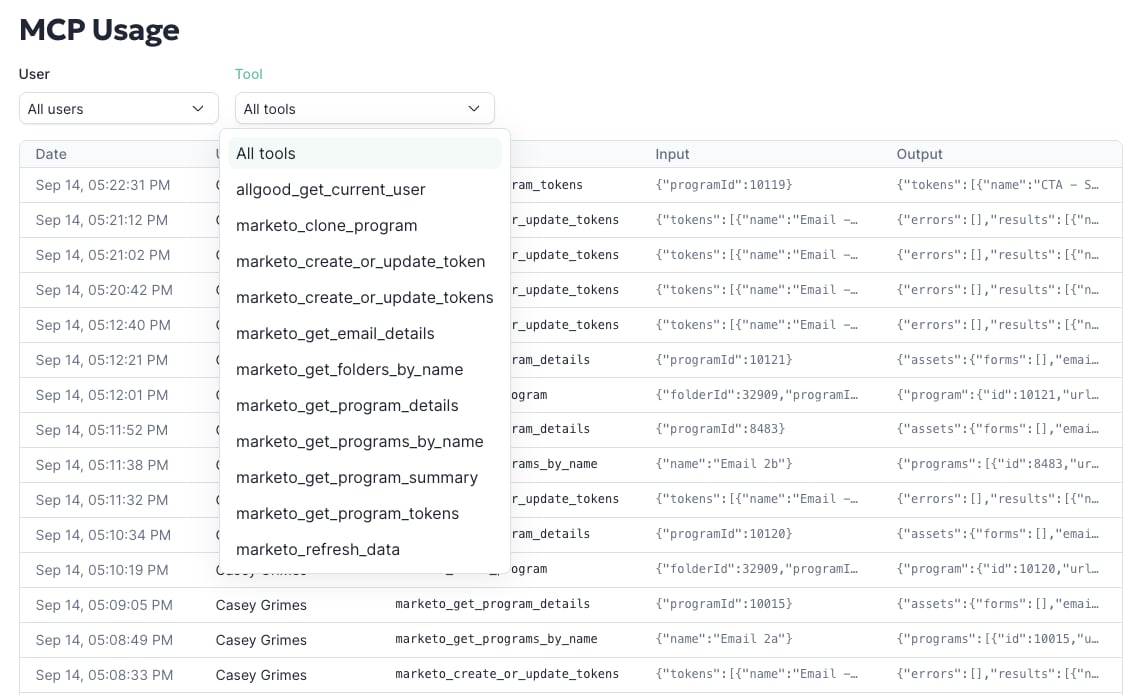 In practice, this means a token update or an email edit made through the MCP is attributable to the person who asked for it. Marketo's own logs would only show "allGood."
## What the connector can and can't do
The full tool list is in [Finding programs and working with data](/use-cases/marketo-mcp/capabilities) and [Editing and sending emails](/use-cases/marketo-mcp/capabilities-editing-emails). Together, they cover finding programs and assets, reading and updating tokens, reading and editing email content and structure, and cloning programs and emails.
It deliberately does not expose delete or unapprove operations — nothing that's hard or impossible to roll back, or that could disrupt a live, sending program. That's a considered scope decision, not a gap: see the [FAQ](/use-cases/marketo-mcp/faq#why-cant-the-mcp-delete-or-unapprove-things) for more on why, including how Adobe's own MCP community independently reached the same conclusion about that category of operations.
## Controlling what the connector is allowed to do
Access isn't all-or-nothing at the connector level. Every individual tool can be set, per user, to run automatically, require approval before each use, or be disabled outright. That lets a team leave read-only lookups on autopilot, while forcing every write operation — token updates, cloning, email edits — to require a person's explicit approval each time. See [Can I control which actions need my approval first?](/use-cases/marketo-mcp/faq#can-i-control-which-actions-need-my-approval-first) for how that's configured.
## Overall security posture, certifications, and subprocessors
The Marketo MCP tools run on the same infrastructure, certifications, and data-handling commitments as the rest of allGood. Connecting it doesn't introduce a separate security posture to evaluate. For the authoritative, up-to-date detail, point a reviewer at:
* **[allGood Trust Center](https://trust.allgoodhq.com)** — SOC 2 Type II (audited annually by Johanson LLP) and GDPR compliance status, plus the public [subprocessor list](https://trust.allgoodhq.com/subprocessors)
* **[allGood Security](https://allgoodhq.com/legal/security)** — encryption (AES-256 at rest, TLS 1.2+ in transit), data residency (AWS us-west-2 with VPC isolation), data deletion (customer data deleted within 60 days of contract termination), and incident response commitments (customer notification within 24 hours of a confirmed incident)
If a reviewer's question isn't answered by this article or the pages above, contact [allGood support](mailto:support@allgoodhq.com).
## Related articles
* [Overview](/use-cases/marketo-mcp/index)
* [Finding programs and working with data](/use-cases/marketo-mcp/capabilities)
* [Editing and sending emails with the allGood Marketo MCP](/use-cases/marketo-mcp/capabilities-editing-emails)
* [Marketo MCP FAQ](/use-cases/marketo-mcp/faq)
In practice, this means a token update or an email edit made through the MCP is attributable to the person who asked for it. Marketo's own logs would only show "allGood."
## What the connector can and can't do
The full tool list is in [Finding programs and working with data](/use-cases/marketo-mcp/capabilities) and [Editing and sending emails](/use-cases/marketo-mcp/capabilities-editing-emails). Together, they cover finding programs and assets, reading and updating tokens, reading and editing email content and structure, and cloning programs and emails.
It deliberately does not expose delete or unapprove operations — nothing that's hard or impossible to roll back, or that could disrupt a live, sending program. That's a considered scope decision, not a gap: see the [FAQ](/use-cases/marketo-mcp/faq#why-cant-the-mcp-delete-or-unapprove-things) for more on why, including how Adobe's own MCP community independently reached the same conclusion about that category of operations.
## Controlling what the connector is allowed to do
Access isn't all-or-nothing at the connector level. Every individual tool can be set, per user, to run automatically, require approval before each use, or be disabled outright. That lets a team leave read-only lookups on autopilot, while forcing every write operation — token updates, cloning, email edits — to require a person's explicit approval each time. See [Can I control which actions need my approval first?](/use-cases/marketo-mcp/faq#can-i-control-which-actions-need-my-approval-first) for how that's configured.
## Overall security posture, certifications, and subprocessors
The Marketo MCP tools run on the same infrastructure, certifications, and data-handling commitments as the rest of allGood. Connecting it doesn't introduce a separate security posture to evaluate. For the authoritative, up-to-date detail, point a reviewer at:
* **[allGood Trust Center](https://trust.allgoodhq.com)** — SOC 2 Type II (audited annually by Johanson LLP) and GDPR compliance status, plus the public [subprocessor list](https://trust.allgoodhq.com/subprocessors)
* **[allGood Security](https://allgoodhq.com/legal/security)** — encryption (AES-256 at rest, TLS 1.2+ in transit), data residency (AWS us-west-2 with VPC isolation), data deletion (customer data deleted within 60 days of contract termination), and incident response commitments (customer notification within 24 hours of a confirmed incident)
If a reviewer's question isn't answered by this article or the pages above, contact [allGood support](mailto:support@allgoodhq.com).
## Related articles
* [Overview](/use-cases/marketo-mcp/index)
* [Finding programs and working with data](/use-cases/marketo-mcp/capabilities)
* [Editing and sending emails with the allGood Marketo MCP](/use-cases/marketo-mcp/capabilities-editing-emails)
* [Marketo MCP FAQ](/use-cases/marketo-mcp/faq)