

What is recorded
This record is written to allGood’s own store, not to the identity provider that holds sign-in and account events. A connection between your SIEM and this audit log can be established.
Reading the log
You’ll find the table of Tool calls under Settings > MCP Usage.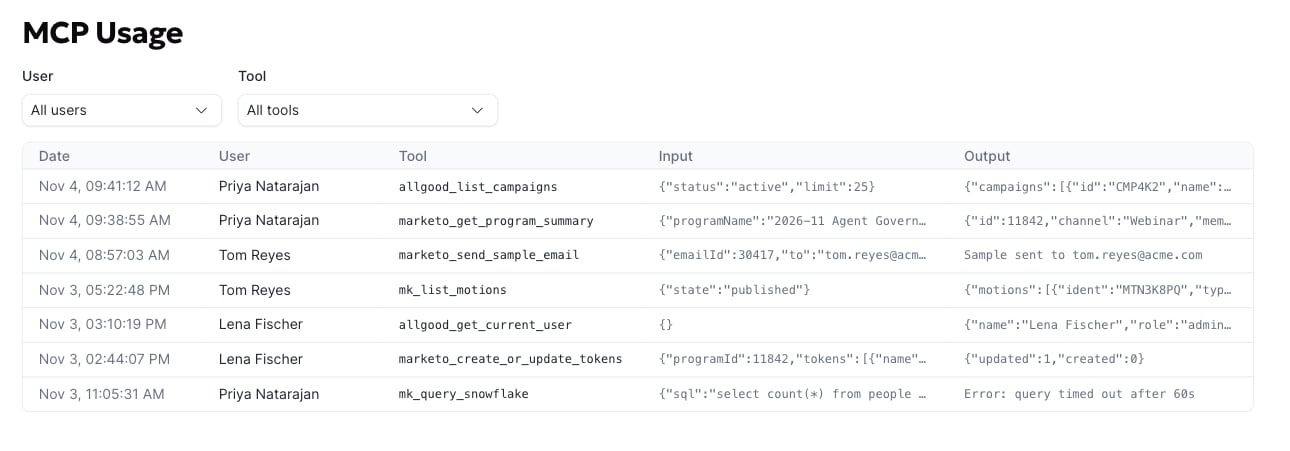
1
Filter by person
The User menu lists everyone who has made at least one call. Pick one to see only their activity.
2
Filter by tool
The Tool menu lists every tool that has ever been called in your account. Useful for “show me every time an agent sent a sample email”.
3
Open a call to see the full payload
The table shows input and output on one line each. Click a row to open the full, pretty-printed input and output in a side panel.
Who can see it
Anyone whose role includes themanage-integrations permission can see this log table, so typically Admins are the only to view this.
Retention and export
Rows are append-only and kept indefinitely today. There is no export or streaming feed yet; ask support if you need a pull for a specific window.Questions? Reach out to support@allgoodhq.com.