

Why email HTML needs a compiler
Email clients do not render HTML the way browsers do. Outlook has used Word’s rendering engine since 2007. It ignores most modern CSS and expects layouts built from tables. A layout that holds up in Outlook, Gmail, and Apple Mail takes long, repetitive markup. You end up solving the same problems in every template, such as a responsive two-column row or a button that survives Outlook. MJML moves that work into the tags. You describe the layout once, and the compiler adds the workarounds each client needs.What an MJML file looks like
An MJML file is XML. The<mjml> root holds one <mj-head> for metadata, such as the title, preview text, and shared style defaults. It also holds one <mj-body>, which is the email itself. The body is built from about thirty tags. These five cover most layouts:
A minimal example:
.mjml source each time.
What the compiler handles for you
Each of these is a workaround you would otherwise remember and repeat in every email:
The trade-off is that you can only build what the component set expresses. For anything else, such as a tracking pixel or custom markup, MJML has one escape hatch:
<mj-raw>. It passes content through untouched. Nothing inside it is validated, and none of the workarounds apply. Using it puts you back in hand-coding for that piece.
The compile step in allGood
In allGood,template.mjml is never sent anywhere. template.html is a build artifact made by running a render script on the MJML source:
{{ asset.copy.content.headline.value }} are filled in later, at send time, against the compiled HTML. Personalization is a separate job from layout. MJML only handles layout.
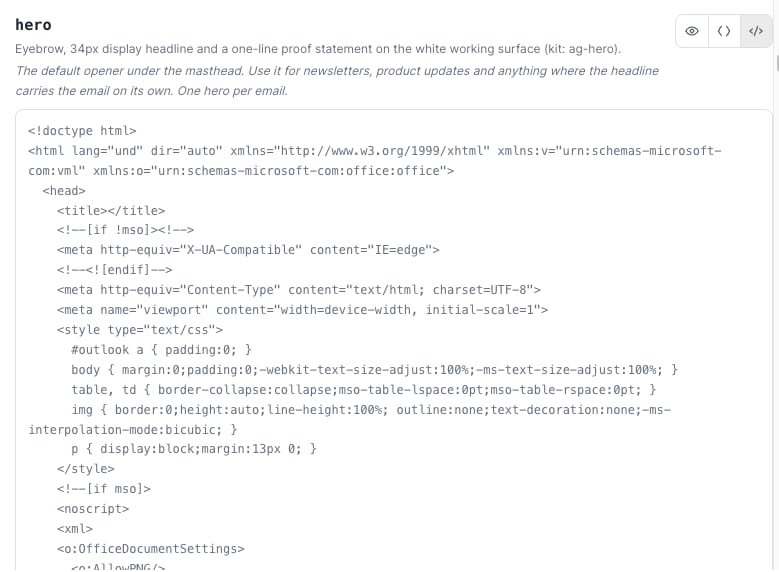
The hero block's MJML source (left) compiles to this HTML. It includes the doctype, MSO conditional comments, and inline reset styles. Nobody writes the right side by hand.
Put a Liquid condition around a whole
mj-section, never around one mj-column in a multi-column section. MJML fixes column widths at render time, before Liquid removes anything. The surviving column keeps its half width and leaves a blank gap. Nothing errors, so it only looks broken in the inbox.Do you have to write MJML?
No. allGood’s AI can convert an existing HTML email, a Marketo template, or a HubSpot module into MJML for you. Review the result before you treat it as finished. Writing components directly is for designers and developers who want full control. See Write an email component.MJML’s own resources
MJML is open source and documented well beyond this article:- MJML: getting started is an interactive tutorial for the same tag-based idea.
- The MJML guide is the full reference. It covers every component and installation option.
- MJML Live is an online editor. Paste MJML on one side to see the compiled HTML and a preview on the other.
- MJML community lists editor plugins, framework integrations, and tutorials.