

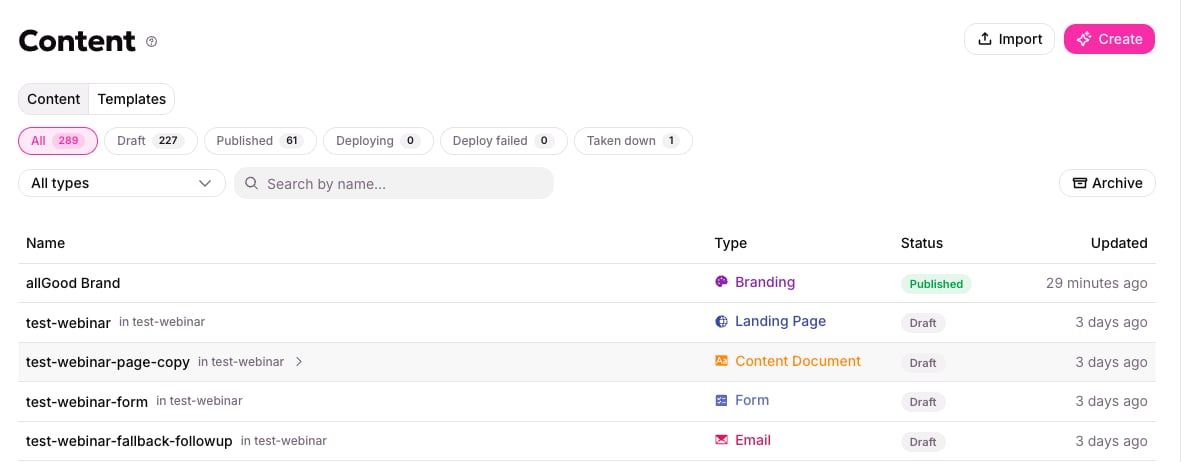
The Content library: one list of every asset, with its type and status.
Start here
Getting started
The whole setup in order, and who does which part.
Publishing and versions
How an email or page goes live, what gets locked in, and what happens when something it uses changes.
Set up once
Marketing ops does these, and mostly does them once. Each one makes every email and page after it easier to produce and harder to get wrong.Brand guidelines
Your colors, fonts, logos and tone, captured once, for every generator to read.
Component libraries
The approved blocks emails and pages are built from, and the check that keeps them on-brand.
Templates
Layouts that list what copy changes, so the next email or page is filled in rather than written.
Make content
Components, templates, and individual emails — write one, preview it as a real person, and send it.
Landing pages
Publish a page on your own subdomain, with a preview link before it goes live.
Forms
Define what a form collects and the consent it records. Your website keeps its own markup.
Visual assets
Generate or upload an image and host it on your subdomain.
Hosted files
Host a PDF or other download on your subdomain, or point to one you already host.
Copy and variants
Copy and variants
Why the words are stored separately, and how one campaign sends more than one version.
Web Edge
The domain, tracking and capture side — what serves the pages and receives the submissions.