

Editing always produces a new version. Nothing is overwritten, so you can go back to any version you published.
Publish every version
There is one button for every type of asset and every version: Publish. The first time you select it, version 1 becomes the published version. You publish every later version the same way, and publishing locks in everything it uses, as described below. For things with an address, such as landing pages and images, publishing also puts the version live there. While that happens the asset shows Deploying. If it can’t finish, it shows Deploy failed.Publishing locks in everything it uses
This is the part worth understanding, because it is what makes publishing mean something. An email is rarely alone. It uses its own copy, was built from a template, composed from a component library, and styled by a brand guideline. When you publish the email, allGood checks everything it uses and locks each one to the version the email was built with. What goes live is exactly what you reviewed. It is not the email you read plus whatever its template says by the time it sends.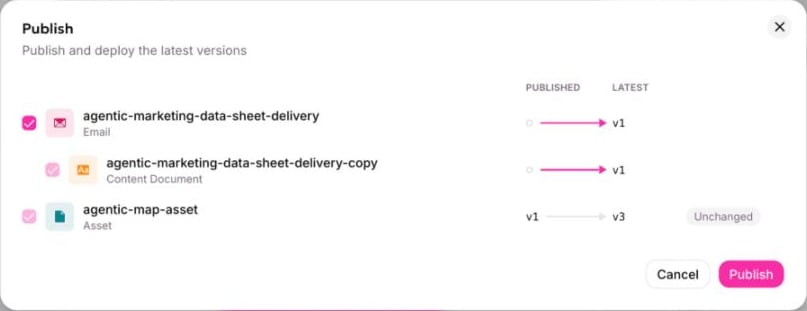
Before publishing, you see everything that will be published with it.
Changes pending
Once something is published, editing it again creates a newer version than the published one. The item then shows a Draft pill beside Published: what is live is not what is latest. That is not an error. It is the normal state of work in progress: you are drafting the next version while the current one stays live.Finding out what is out of date
Locking versions also makes a rebrand easy to track. Every email and page records which version of the brand and component library it was built with. When you publish a new brand, everything built on the old one shows as out of date. You get a list of what to revisit instead of a guess. The same applies to a component library, a template, or anything else an item uses.What an edit affects
Before changing something, open its References section to see what the edit reaches:- what this item uses
- what uses it
- which live campaigns use it
- what it was copied from, or copied into
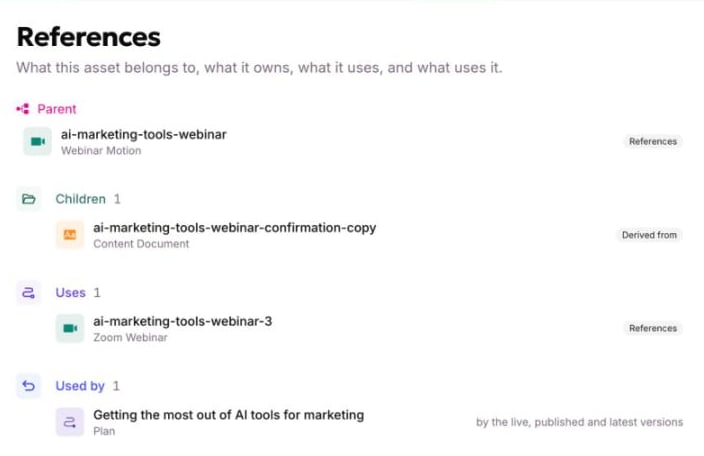
What an edit would reach, before you make it.
Going back
- Roll back to any earlier version. It is copied into a new version, which goes live once you publish it.
- Take down removes a page, image, or file from its address but keeps it, so publishing it again needs no rebuild.
History
The Versions panel on the right of every item shows its versions and every status change, each with who did it and when, and the message whoever published it left.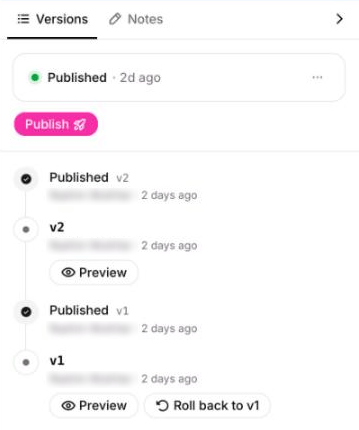
Every version and every status change, with who did it.
History tells you a version was made and who made it. It doesn’t show which fields changed between two versions. Ask an agent to diff them if you need that.
Items a campaign owns
An email or page that a motion created is published from that motion, not from its own page. Its page names the owner and links to it, but has no publish controls. This keeps a campaign’s items going live together, so nobody publishes one early while tidying the library.Who can publish
Publishing is governed by the same roles and permissions as everything else in allGood, not by a separate content-only setting. See Users and roles for what each role can do, and for custom roles if you need a narrower split than the standard four.Good to know
- Everything an authoring session produced can be published in one pass, rather than one item at a time.
- Publishing is per version, not per item. Publishing v4 says nothing about v5.
- Something unpublished is published together with whatever uses it. Everything is published at once, starting with what the item uses, so you cannot publish half of it.