

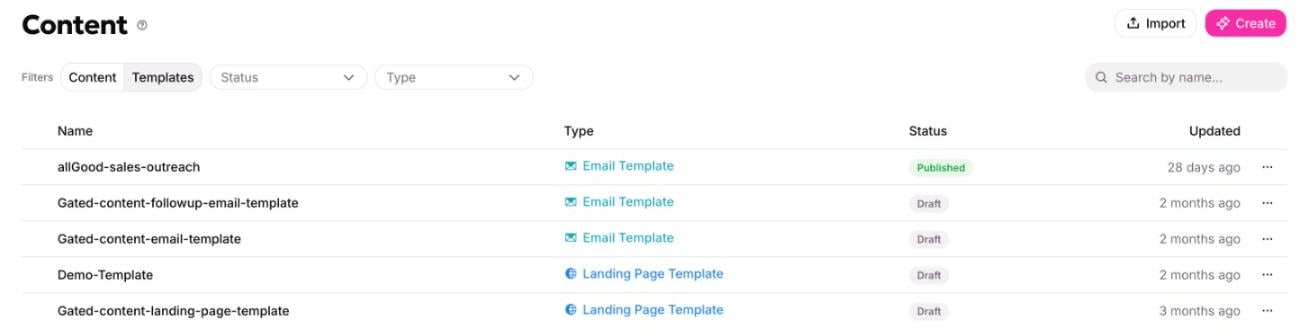
Templates are the other half of the library, reached by the toggle.
Three ways to build one
All three land in the same place. Pick whichever matches what you already have.From a written brief
From a written brief
Describe the layout you want — what sections, in what order, for what kind of message. Best when you are starting fresh and have a clear idea.
From a URL
From a URL
Give the address of a page whose layout you want to work from. allGood reads the live page and builds a layout from it. Best when the thing you want to match is already on the web.
From an email or page you already have
From an email or page you already have
Point at an email or landing page already in allGood. Best once you have made a few by hand and want to stop remaking the same shape.
The copy schema
The copy schema names what changes. A marketer filling the template supplies exactly those fields and nothing else.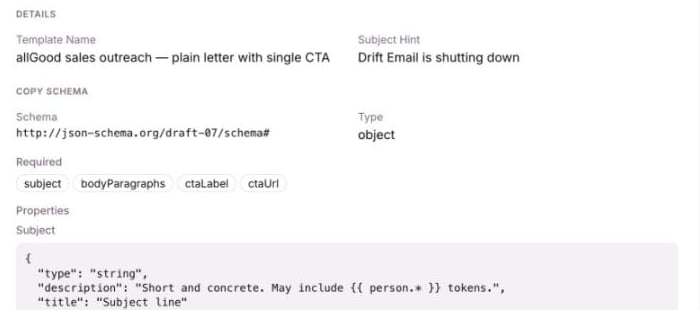
The copy schema: the named fields the next email or page has to supply.
headline and cta_text are better than field_1 and field_2, for the same reason component guidance is better than component numbering.
The schema is a declaration that the authoring workflow reads and fills. It is not enforced on the finished email or page — nothing outside the workflow checks that a filled email matches the schema its template declared. Treat it as a strong convention rather than a guarantee.
Cloned and shared parts
A template also says which of its parts are rebuilt for each email or page and which are shared across all of them.
You do not configure this. It is a property of each type, and it is why filling a template twice gives you two separate forms but one logo.
Good to know
- A template cannot change a motion’s shape. A motion template is a different thing, and it lives with motions, not here.
- Publishing a template locks in what it was built from: the brand and the component library, at the versions it was built against. Change either later and the template shows as out of date.
- A template is worth making for the third email, not the first. You need to have made the shape a couple of times to know what actually varies.