

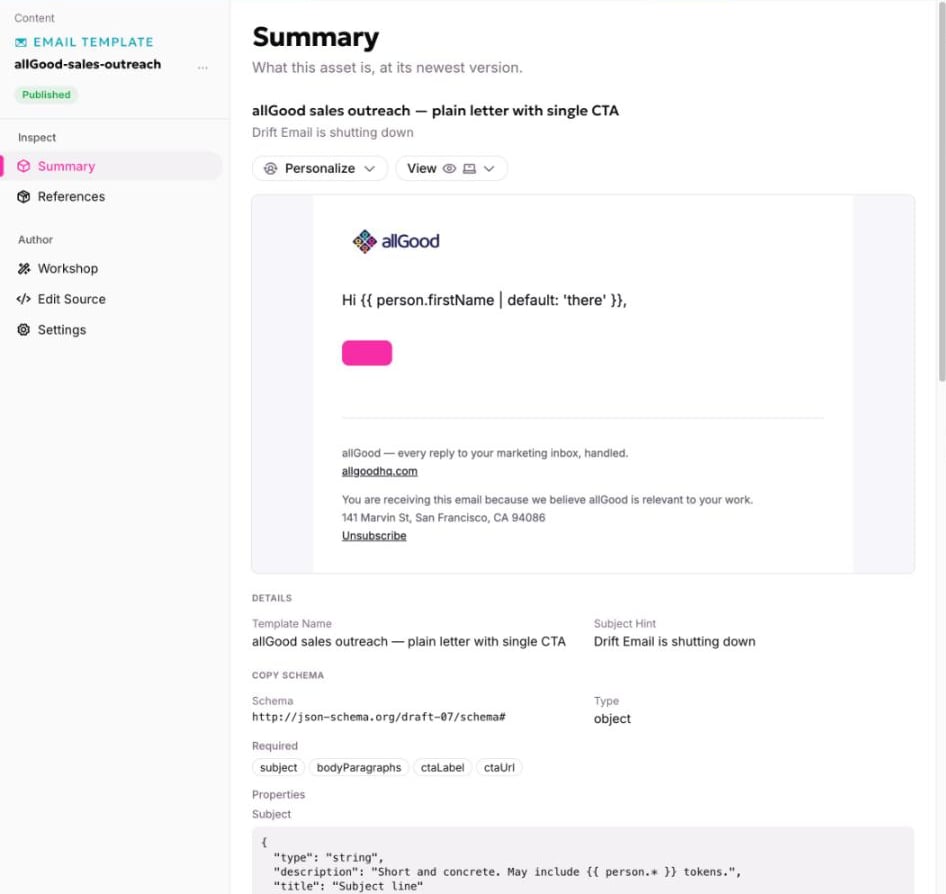
An email template's Summary: the rendered design, and below it the copy schema.
How a template relates to its neighbors
A template is a building block, not something you send. An email is built from it and keeps a record of which template it came from.
How it works
Wherever the email needs a headline or a button label, the design points at a copy field: a field in the copy schema, by name. The words themselves live in a separate copy document that each email gets for itself. See Copy and variants. Because the words and the design are separate, a writer can change the message without touching the design, and the design only needs reviewing once.Personalization can be built in
A template can also carry merge fields, so the standard behavior is in place before anyone writes a word. A greeting such asHi {{ person.firstName | default: 'there' }}, can sit in the design, and every email built from the template inherits it. See Personalizing an email for the fields you can use.
Show the defaults in the template
Copy fields are the minimum. You can also leave realistic example copy next to each one, so anyone who opens the template sees what a good headline or button label looks like and where it goes. A template that shows its intended content is easier to fill in correctly than one that shows only empty field names. The design itself is written in MJML, the email-building language allGood uses, and allGood turns it into email-safe HTML ahead of time. You don’t need to know MJML to use a template. If you’re curious, see What MJML is.What is rebuilt and what is shared
When someone makes an email from a template, some parts are copied fresh for that email and some are shared.- Copy document: copied fresh. The words are what changes, so two emails never share one.
- Form: copied fresh, so two assets from one template never collect into the same place.
- Images and hosted files: shared. The files are identical, so copying them adds nothing.
Coming from Marketo
In Marketo, an “email template” is the HTML layout an email is built on. That is closer to allGood’s components than to an allGood email template. An allGood email template is closer to the pre-baked email inside a program template: the layout, the standard personalization, and sensible default content already in place, ready to be cloned and edited for each campaign. See Coming from Marketo or HubSpot.Why it matters
A template is where brand control meets speed. Every template is built from your approved components and checked against your brand guidelines, so an email made from it stays on-brand without anyone re-checking the layout.A template pays off by the third email, not the first. Make a couple of emails by hand first, so you can see what really changes from send to send.