

Prerequisites
- Access to the Web Edge Sessions settings page
- Access to your DNS provider — wherever you manage records for the domain you want to use — or a teammate who has it
- The exact subdomain you want to use for landing pages and forms, for example
pages.yourbrand.com
How registration works
Two settings work together here. Allowed origins controls which browser origins can submit form data or send tracking events. Each submission is checked against the browser’s Origin header. That’s a label every browser request carries automatically — your IT or web team will recognize it even if the term is new to you. The match must be exact, including thehttps:// part. Wildcards aren’t allowed either — you can’t enter *.yourbrand.com to cover every subdomain at once; each origin needs its own exact entry. Until you add at least one origin, only your own allGood-hosted pages can submit — a browser on any other site gets refused.
Registering a subdomain starts a four-stage process, tracked in the Progress column for each row:
- Hostname created — allGood has registered your subdomain and is ready for its DNS records.
- DNS propagated — allGood has found and verified the DNS records you added.
- SSL active — your SSL certificate has been issued, so the subdomain is secure.
- Bot protection ready — a bot-protection widget has been provisioned for forms that need one.

The domain table, showing the four-step progress rail and the default domain badge.
Bot protection provisions last, and only after you click Sync on an active domain. Until then, forms that require a bot check can’t be registered on that subdomain.
Add your allowed origins
Think through everywhere your forms and tracking need to work, not only your main site. A third-party platform can serve pages on your behalf — for example, a content platform hosting pages atyourcompany.pathfactory.com. Add that origin too, or its forms and tracking events get silently blocked. Add every origin you recognize and want to allow. Leave out anything you don’t — that’s what keeps this list a real security boundary, not a formality.
1
Open Web Edge Sessions
Open Web Edge Sessions in your account settings.
2
Enter the origin
In the Allowed origins section, enter the full origin — including the
https:// part — in Add an origin. For example: https://www.yourbrand.com.3
Add it
Click Add.
Register a subdomain
If you’re migrating off another platform — Marketo, HubSpot, or similar — don’t register the subdomain that platform is using today. Keep that one free so you can redirect old links to your new allGood pages once you cut over. Register a different subdomain here instead, such aspages.yourbrand.com or marketing.yourbrand.com.

The Add a subdomain card, where you register the hostname.
1
Enter your hostname
In the Add a subdomain section, enter your subdomain in Hostname. For example:
pages.yourbrand.com.2
Register it
Click Register.
Add the DNS records at your provider
Go to your DNS provider — the place you bought or manage the domain. A CNAME record is a DNS instruction that points one address at another. It’s how you tell the internet your subdomain actually lives at allGood, without moving your whole domain. Add both CNAME records shown in the DNS setup panel:- A CNAME record on your subdomain, for example
pages.yourbrand.com. This routes visitors on the subdomain to allGood Edge — the network that hosts and serves your pages. - A CNAME record on
_acme-challenge.plus your subdomain. The unusual-looking prefix is expected — copy it exactly as shown. This delegates SSL certificate validation to allGood, so your certificate renews automatically. Add it once and you’re done.
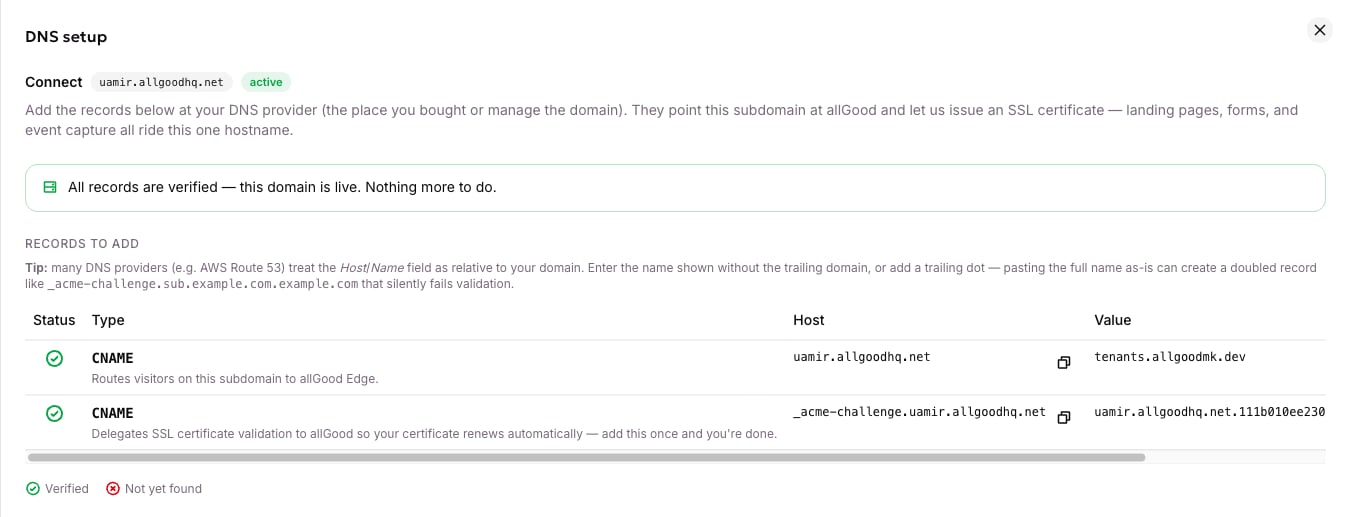
The DNS drawer once every record has resolved and the domain is live.
The values in your DNS setup panel are unique to your subdomain. Always copy the host and value shown to you there — don’t reuse values from this article or from another subdomain.
Recheck your DNS and finish provisioning
1
Wait for DNS to propagate
This can take a few minutes to an hour worldwide.
2
Sync your records
Back on Web Edge Sessions, click Sync to re-check your records.
3
Watch State move to active
Watch State move from propagating to active. Each step in Progress turns to done in order: Hostname created, DNS propagated, SSL active, then Bot protection ready.

The status chip reading Live at the edge.
Manage multiple domains
If you connect more than one subdomain, one of them is your default. That’s the domain automatically filled into any snippet or URL allGood generates — your tracking tag, for example, or a form’s capture endpoint. Only an active domain can be the default, and there’s always exactly one. To change it, or to remove a domain you no longer need, open the row’s ⋮ menu.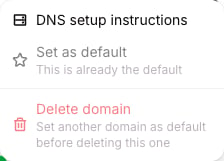
The row actions menu, with DNS setup instructions, Set as default and Delete domain.
- Set as default makes this domain the one allGood uses for new snippets and URLs going forward. Pages already published and tags already installed keep working — switching the default only changes what gets generated after you switch it.
- Delete domain asks you to type the hostname to confirm, then immediately stops landing pages, form capture, and tracking on that subdomain. You can’t delete the current default — make another domain the default first.
Related articles
- How Web Edge keeps your domain secure
- Set up Web Tracking on your site
- Web Edge FAQ
- Turn on bot protection for a form
- Create a landing page (TBD)
- Need the domain-connection or edge-sync internals? See the developer reference: Connect a domain and Edge Sync