

Can I control which actions need my approval first?
Yes. Permissions are set per tool, not per connector. Each tool has three states: always allow, ask each time, or never allow. Tools are grouped by category, like read-only tools. Admins can set this for the whole workspace, and members can’t override it. On Claude Team and Enterprise, an Owner sets it in the connector’s tool permissions. On ChatGPT Enterprise and Edu, admins can turn off individual actions. See Roll out the Marketo MCP to your organization. If you’re not an admin, you’ll find the same options in your client’s tool permissions settings. That means you can leave lookups running freely — searching for a program, or getting a program summary. You can force anything that writes to Marketo onto “ask each time” instead — updating a token, cloning a program, editing an email. Or you can disable a write tool outright if your team doesn’t want it available at all. You’ll only ever see tools your organization has already given you access to. This setting controls how those tools behave, not which ones you can see.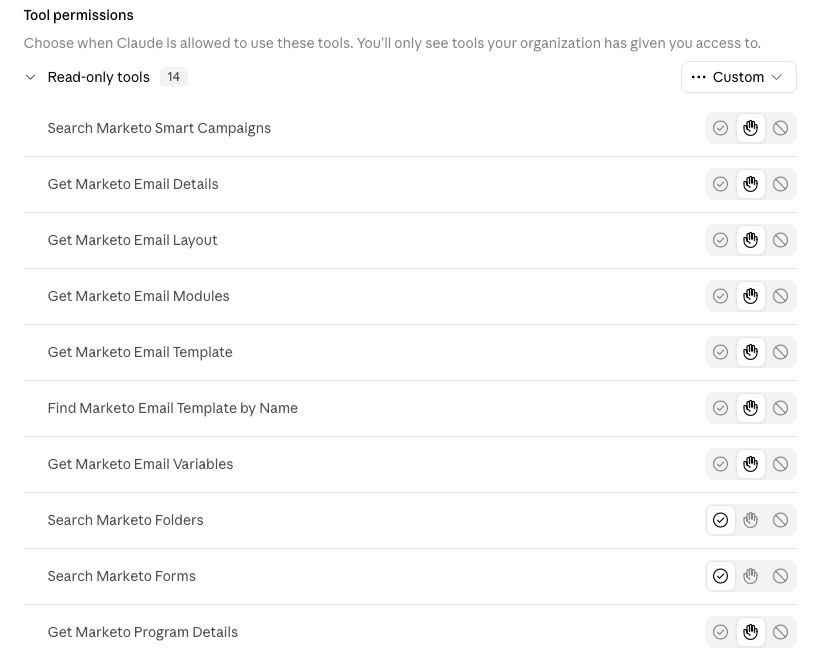
Tool permissions screen showing read-only tools set to always allow
How is this different from Marketo’s own MCP?
Adobe ships its own native Marketo MCP alongside the REST API. By its own community’s account, it leans read-heavy: strong for natural-language lookups, smart-list and smart-campaign configuration help, and analysis. But lead data writeback, program-member reporting, and email/landing-page lifecycle management are all pushed back to the REST API instead of exposed as MCP tools. See Marketo’s MCP vs REST API for the full comparison. Separately, users have found tools listed in Adobe’s own documentation that don’t actually work against the live server. These are destructive operations Adobe intentionally disabled, without updating the docs to match. See 14 MCP tools listed on Adobe’s official docs but not available in the MCP server. allGood’s Marketo MCP covers a narrower surface by design. But it includes the write operations Adobe’s own MCP leaves to REST — token updates, email content edits, program and email cloning — with per-user attribution built in from the start.Can I use allGood’s skills with only Marketo’s own MCP connected?
Partially. Program-building skills can do most of the work — roughly 80% — using just Marketo’s native MCP. Token writes specifically aren’t available through it. Connecting the allGood Marketo MCP is what enables the token-update tools.Why can’t the MCP delete or unapprove things?
Because those operations are hard or impossible to roll back. A mistaken one can disrupt a live, sending program. The one removal tool, Remove a module from an email, edits the email’s draft only and is marked as destructive, so clients ask for approval before it runs. That’s a deliberate scope decision, and it isn’t just allGood’s instinct — Adobe’s own community independently flagged the same category of operations as too risky to expose, even in Adobe’s native MCP.If this doesn’t answer your question, contact allGood support.