

What data flows through it
The Marketo MCP tools read and write Marketo program and email data: programs, folders, tokens, email content and templates, forms, and smart campaign names. They do not read or write lead or contact records. No lead PII passes through this tool surface. Processing and hosting for these tools is in AWS us-west-2 (Oregon). That matches allGood’s stated data residency for the platform as a whole (see below).Email sending scope
The allGood Marketo MCP does not communicate with your contacts or leads, and it is not used as an email server. The only send-capable tool in this surface — Send a sample email — delivers a single test copy of an email’s current draft to one address you specify, for review before it ships. It doesn’t add or remove list members and doesn’t affect performance stats. All email that actually reaches your contacts and leads is sent by Marketo itself, through its own smart campaigns and triggers — the Marketo MCP tools never send to an audience.Authentication and access model
Each person connects with their own allGood account, through their own OAuth session in their AI client (Claude Desktop or ChatGPT Desktop) — not a credential shared across the team. Authentication runs through allGood’s identity provider; the connector doesn’t request a separate, bespoke set of API scopes the way some third-party integrations do. See Claude Desktop setup for what that authorization step looks like. What actually governs what a person can do is allGood’s own permission system, checked on every tool call:- Looking things up (searching programs, reading emails, checking tokens) requires View, Use, or Manage on Campaigns
- Making changes (updating tokens or tags, editing email content or modules) requires Use or Manage on Campaigns
- Cloning a program or email requires Manage on Campaigns specifically — the most privileged of the three
Per-user governance log
Because Marketo only sees one shared allGood credential, allGood separately records who actually made each change. Every MCP tool call your tenant makes — across the Marketo tools and every other MCP surface — is logged: the tool called, its full arguments, its full result, a timestamp, and the user who made the call. This is queryable in the product at Settings → MCP Usage: a filterable, newest-first table of every call, filterable by user or by tool, with the full argument and result payload for any row available on demand.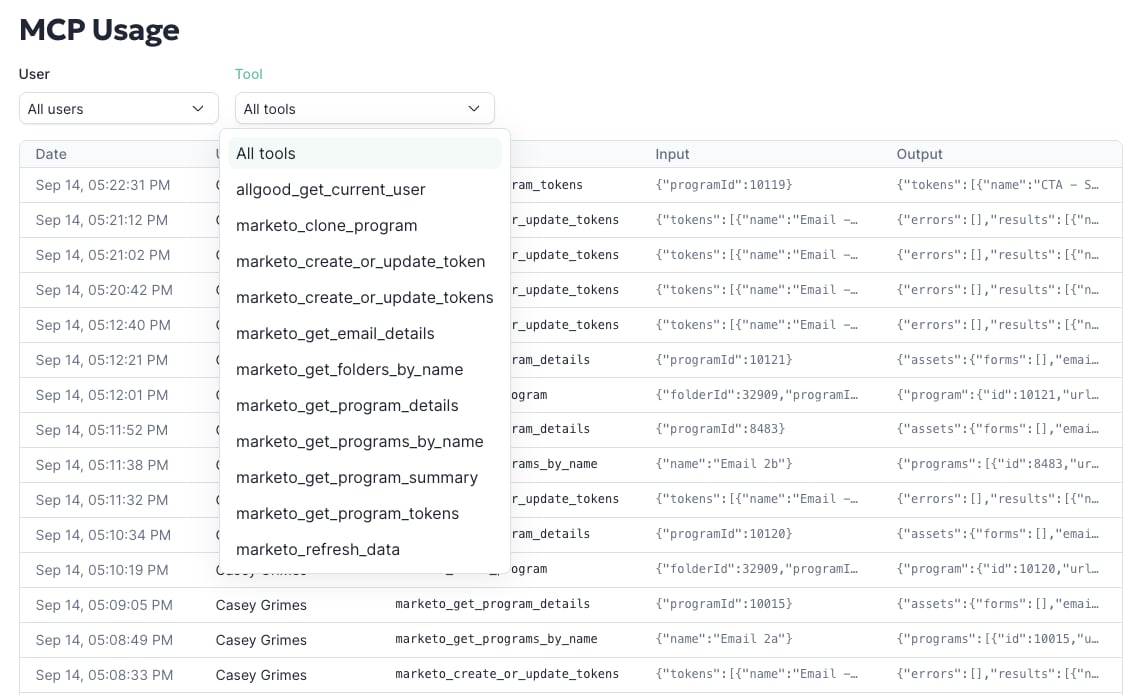
MCP Usage log showing calls filterable by user and tool, with input and output columns
What the connector can and can’t do
The full tool list is in Finding programs and working with data and Editing and sending emails. Together, they cover finding programs and assets, reading and updating tokens, reading and editing email content and structure, and cloning programs and emails. It deliberately does not expose operations that delete programs, emails, or assets, or that unapprove them. Those are hard or impossible to roll back, and a mistaken one can disrupt a live, sending program. One tool does remove content: Remove a module from an email. It edits the email’s draft only, and Marketo keeps sending the approved version until someone approves the draft in Marketo. Adding the module back doesn’t restore its content, so the connector marks this tool as destructive and clients treat it as a change that needs approval. That’s a considered scope decision, not a gap: see the FAQ for more on why, including how Adobe’s own MCP community independently reached the same conclusion about that category of operations.Controlling what the connector is allowed to do
Access isn’t all-or-nothing at the connector level. Admins can set every tool to run automatically, require approval before each use, or stay blocked, for the whole workspace. Members can’t override that policy. A common setup leaves read-only lookups on autopilot and requires approval for every write: token updates, cloning, and email edits. On Claude, Team and Enterprise Owners set this in the connector’s tool permissions. Per-tool settings and per-role access need an Enterprise plan with custom roles. On ChatGPT, Enterprise and Edu admins can turn off individual actions. See Roll out the Marketo MCP to your organization for the steps and a recommended policy.Common questions
Does Marketo need to approve this before it works?
No. Marketo’s approval process applies to Adobe’s own native Marketo MCP, not allGood’s. Connecting the allGood Marketo MCP needs an allGood account with the Marketo integration already set up. There’s no separate Marketo-side legal or admin review first.Overall security posture, certifications, and subprocessors
The Marketo MCP tools run on the same infrastructure, certifications, and data-handling commitments as the rest of allGood. Connecting it doesn’t introduce a separate security posture to evaluate. For the authoritative, up-to-date detail, point a reviewer at:- allGood Trust Center — SOC 2 Type II (audited annually by Johanson LLP) and GDPR compliance status, plus the public subprocessor list
- allGood Security — encryption (AES-256 at rest, TLS 1.2+ in transit), data residency (AWS us-west-2 with VPC isolation), data deletion (customer data deleted within 60 days of contract termination), and incident response commitments (customer notification within 24 hours of a confirmed incident)